Alt-Text Optimizer Pro - Configuration
All settings at a glance: API, image analysis and alt text rules.
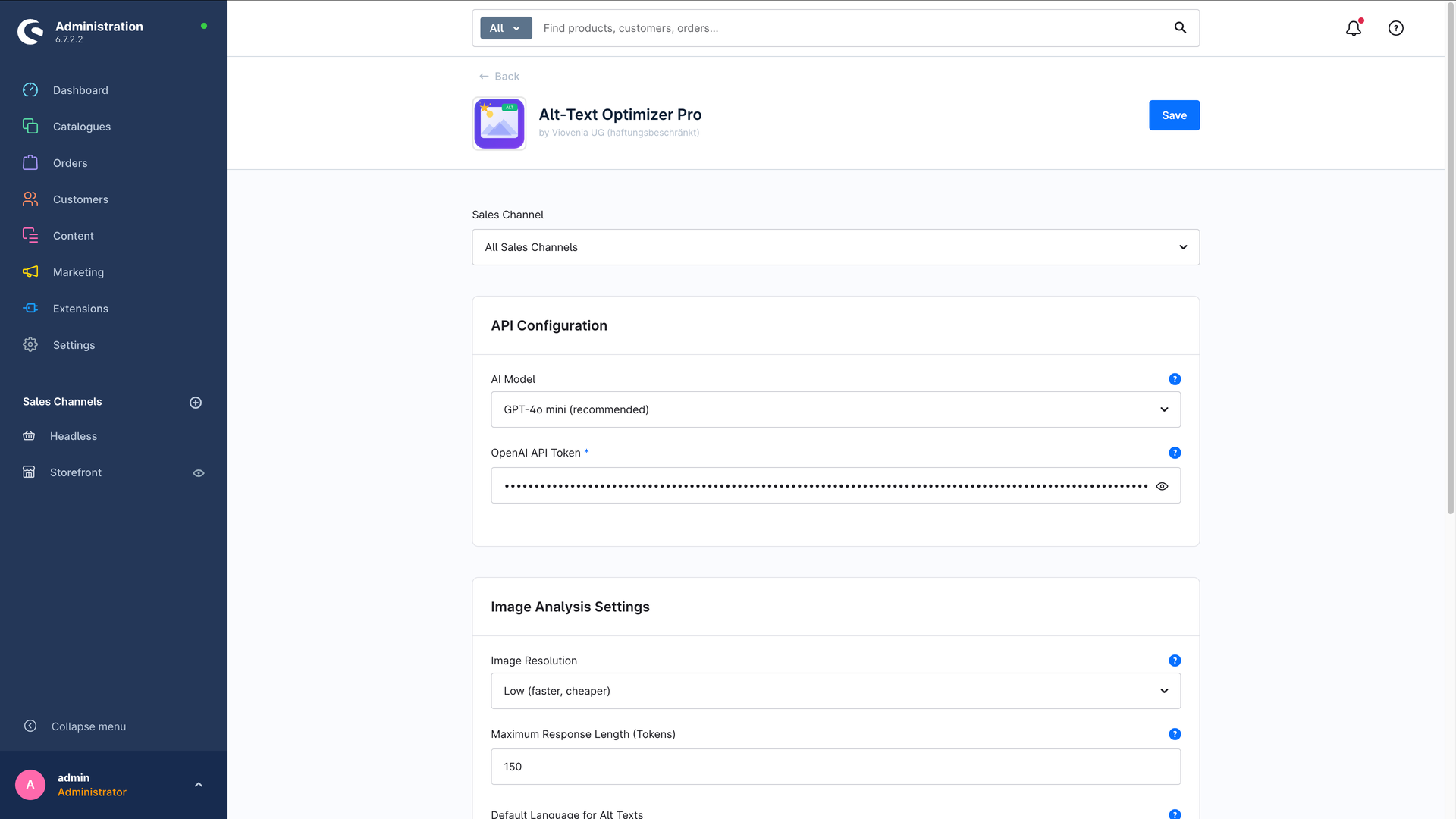
You'll find the settings in the administration under Extensions → My extensions → Alt-Text Optimizer Pro → … → Configuration. They are split into three clear sections.
Good news: for most shops the default values already work very well. You can get started right away and don't need to change anything here – apart from the OpenAI key you added in the previous step.
1. API configuration
This is where you decide which AI is used, and with which key.
| Setting | What it means | Default |
|---|---|---|
| AI model | The OpenAI model that describes your images. GPT-4o mini is cheap and fast – the recommended choice. | GPT-4o mini |
| OpenAI API token | Your key from platform.openai.com. Required – nothing works without it. | – |
2. Image analysis settings
These settings determine how closely the AI looks – and therefore how much the analysis costs.
| Setting | What it means | Default |
|---|---|---|
| Image resolution | Low is fast and cheap and is plenty for most product images. High picks up more detail (small text, for instance) but costs more. Automatic lets the AI decide. | Low |
| Maximum response length (tokens) | A technical upper limit for the AI's answer. One "token" is roughly 4 characters. The default is comfortably enough for an alt text. | 150 |
| Default language | Which language the alt texts are written in, as long as no target languages are set. | German |
| Target languages | The shop languages to generate in – as many as you like. Empty = one text in the shop's default language (the behaviour from before version 1.3.0). | empty |
| Generation mode | With several target languages: One request per image (cheap, default) or One request per image and language (pricier, maximum quality per language). | One request per image |
| Child languages: inherit the parent language's text | Copies the parent language's text into child languages such as "German (Switzerland)" instead of paying to recreate it. | – |
| Protected terms (do not translate) | Comma-separated brand and product names (e.g. AquaFlex Pro, SoftTouch) that stay unchanged in every language. | empty |
Running a multi-language shop? Then the multilingual alt texts chapter is worth your time – it explains in detail what the four language settings do and how to add a new shop language without touching your existing texts.
How is the language determined?
If you have set target languages, it's unambiguous: generation happens in exactly those languages and every text is stored under the right one.
Without target languages the plugin works through this in order:
- If you set a default language here, that one is used.
- If none is set, the plugin takes the language of the shop context.
- If that doesn't work either, German is the fallback.
Without target languages the text is written in the default language you set, but stored under the shop's default language. If the two differ, the generation page points that out. Storing it under the correct language only happens with configured target languages.
3. Alt text settings
Here you decide how long the finished texts may be.
| Setting | What it means | Default |
|---|---|---|
| Minimum number of characters | Lower bound. If a result comes out shorter, it is discarded and you get a message. | 20 |
| Maximum number of characters | Upper bound. Longer texts are trimmed cleanly. Proven for SEO: 80–125 characters. | 125 |
| Include product name | When enabled, the product name and description feed in as context – which makes the texts for product images more accurate. With several target languages, each in the matching language. | enabled |
| Skip existing alt texts | When enabled, each image is only generated in the languages that don't have a text yet. Protects hand-written texts and saves API cost. | enabled |
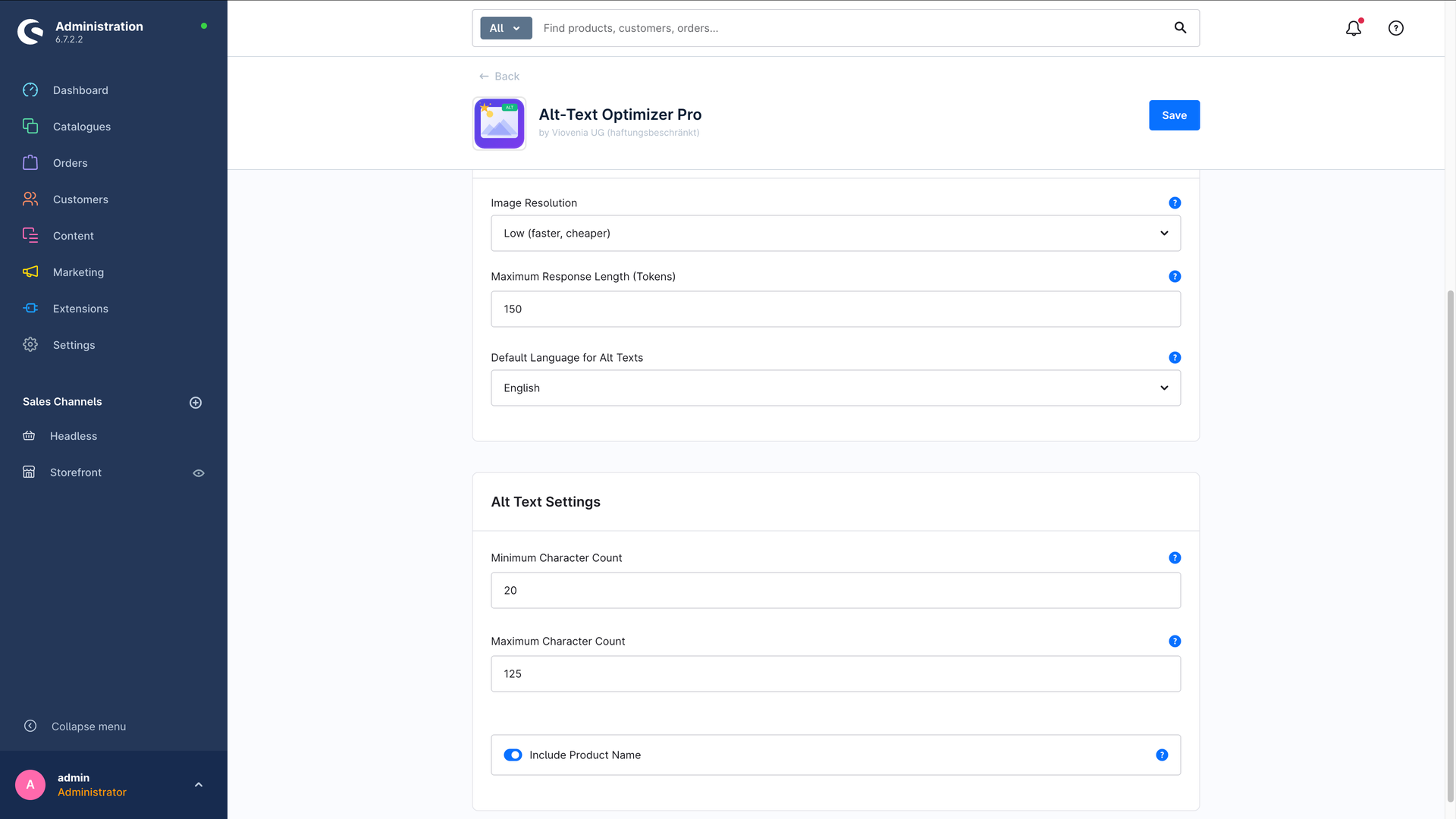
If a text exceeds the maximum length, the plugin trims it automatically and appends "…". If it is shorter than the minimum length, it is discarded – in that case lower the minimum length or raise the response length (tokens).
What we recommend to start with
For most shops this combination is a good starting point – and it is already preconfigured:
- Model: GPT-4o mini
- Image resolution: Low
- Default language: German (or the language of your shop)
- Target languages: leave empty for single-language shops – for multi-language shops, select every language you need alt texts in
- Generation mode: One request per image
- Min./max. length: 20 / 125 characters
- Include product name: enabled
- Skip existing alt texts: enabled
That gives you meaningful, SEO-friendly alt texts at minimal cost. How to generate them is covered in the next chapter: Generating alt texts.