Alt-Text Optimizer Pro
AI-generated alt texts for your Shopware shop – at the push of a button. Instead of typing hundreds of alt texts by hand, the AI does it in minutes – better for SEO, more accessible, and for fractions of a cent per image.
- Alt texts for hundreds of images at the push of a button – instead of hours of manual work
- Better image SEO and a real step toward an accessible shop
- Fractions of a cent per image via your own OpenAI key
- Multilingual across every shop language – its own alt text per language
Built by Viovenia · set up in minutes · no developer needed
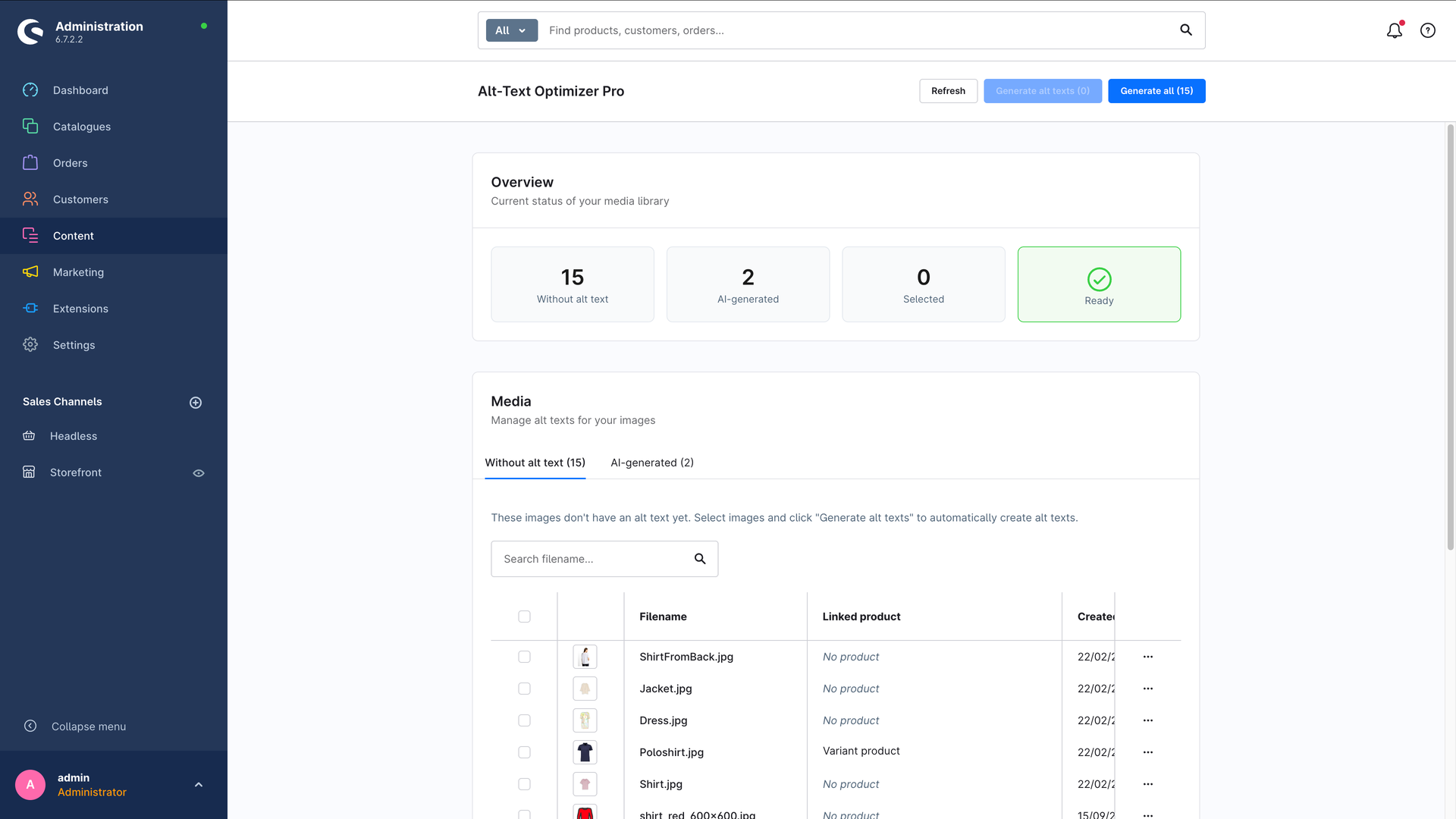
Right inside the Shopware administration – no extra tool, no developer needed.
Why alt texts drive revenue and reduce risk
Missing alt texts are not a cosmetic problem. They cost you visibility, hold back accessibility and tie up working hours you can’t spare.
Visibility on Google
Search engines don’t “see” images – they read the alt text. Without it you give away rankings in Google Image Search and valuable signals for your shop’s overall ranking.
Accessibility & compliance
Accessibility rules such as the European Accessibility Act require many online shops to make their content accessible. Meaningful alt texts are a mandatory building block – and they save you expensive rework later.
Impossible by hand
A typical shop has hundreds or thousands of product images. Writing every alt text manually costs days of work – time your team doesn’t have.
Up and running in minutes
No development project – install it, add your key, start generating.
- 1
Install & activate
Buy, install and activate Alt-Text Optimizer Pro like any other Shopware plugin from the store – done in a few clicks.
- 2
Add your OpenAI key
Enter your OpenAI API key once in the plugin settings and optionally set language, length and resolution.
- 3
Generate at the push of a button
In the administration under “Content → Alt-Text Optimizer Pro”, pick images without an alt text and generate them one by one or in bulk – no developer needed.
What Alt-Text Optimizer Pro does
AI-powered image analysis
Uses the OpenAI vision models (GPT-4o mini by default) to “understand” your images and write fitting, natural-sounding alt texts.
Multilingual
Alt texts in as many shop languages as you like – in a single run. Every language gets its own text as a media translation, and existing texts stay untouched if you want them to.
Product context
If you want, the product name and description feed into the generation – for accurate descriptions instead of generic filler.
Full control over length
Set a minimum and maximum length. Texts that come out too short are discarded, overly long ones are trimmed cleanly – ideal for SEO (recommended: 80–125 characters).
Control resolution & cost
Choose between low (fast & cheap), high (more detail) or automatic image resolution, and cap the number of tokens per request.
Configurable per sales channel
Every setting can be overridden per sales channel – for different languages, models or budgets in each shop.
What it costs – and what you save
Many alt text services bill per image and get more expensive with every upload. Here you pay your direct OpenAI cost – plus the one-off license.
Other alt text services
- Priced per image – often several cents to euros
- Recurring subscription that grows with every image
- Doesn’t know your product – generic descriptions
- Your data travels through someone else’s platform
Alt-Text Optimizer Pro
- Only your OpenAI cost: fractions of a cent per image
- A one-off plugin license instead of a per-image subscription
- Uses product name & description as context
- Your own OpenAI key – full cost and data control
For example: 1,000 product images typically cost just a few euros in OpenAI fees with GPT-4o mini and low resolution – once, not per month.
Ready to make your images visible?
Get Alt-Text Optimizer Pro from the Shopware Store, or read the step-by-step guide first.
Frequently asked questions
- Why bother with alt texts at all?
- Alt texts are what Google “reads” about an image – without them you give away rankings in image search and in your overall ranking. They are also a core building block of accessibility, which is now legally required for many online shops in the EU. Doing hundreds or thousands of product images by hand is barely feasible – that is exactly what the plugin takes off your plate.
- Does this pay off compared to other alt text services?
- Usually yes. Many online services charge anywhere from a few cents to several euros per image and know nothing about your product. Here you pay the OpenAI cost directly – with GPT-4o mini and low resolution that is fractions of a cent per image – plus the one-off plugin license. Full cost transparency, no per-image subscription, and the texts can take your product context into account.
- How quickly is it set up?
- In a few minutes: install the plugin, add your OpenAI API key once, done. After that you generate alt texts straight from the administration – no code, no developer.
- Do I need my own OpenAI account?
- Yes. The plugin uses your own OpenAI API key, so the costs are billed transparently through your OpenAI account. You can create the key for free at platform.openai.com.
- Which languages does the plugin work in?
- In every language your shop has – including ones beyond the usual suspects, like Polish or Swedish. You pick your target languages in the settings and get a dedicated alt text per language for each image. Without target languages the plugin generates in the shop default language only, just as before.
- Do I stay in control of the texts?
- Always. Generated alt texts land in the normal alt text field of the media item and are flagged as “AI-generated” – you see them collected in a dedicated list and can regenerate, edit or remove them at any time.
- Which Shopware version is the plugin built for?
- Alt-Text Optimizer Pro is built for Shopware 6.7.
Tell us about your project
Free intro call, no strings attached – we get back to you personally and quickly.