Labelling AI content: what has applied to online stores since 2 August 2026
16 min read
by Marcel, Senior software engineer
You generated the lifestyle shot for your category page with Midjourney. Roughly 80 % of your product copy came out of ChatGPT. And in support, a chatbot handles the first round of questions. That's completely normal in 2026 – and since 2 August 2026 it has legal consequences. That's the day the transparency obligations in Article 50 of the EU AI Act (Regulation (EU) 2024/1689) became applicable. They don't just hit OpenAI and Google. They hit anyone who uses AI systems in their own business – which includes you as a store owner.
The short version
- The short answer: Since August 2, 2026 you have to visibly label AI-generated or substantially AI-manipulated images, video and audio that look real – at the latest when a customer is first exposed to them (Art. 50 EU AI Act).
- Also covered: AI chatbots need a disclosure before the first interaction; certain AI-generated texts carry a disclosure obligation on top.
- The risk: Fines of up to €15 million or 3% of worldwide turnover (Art. 99(4)) – and, more immediately, competition-law warning letters.
- The fix: In Shopware, our EU AI Act Compliance plugin handles the badge, the chatbot disclosure and the evidence largely automatically.
In a bit more detail: if your store shows AI-generated or substantially AI-manipulated images, video or audio that look real, you have to label that visibly – at the latest when a customer is first exposed to the content. If you run an AI chatbot, you have to tell customers they're talking to a machine. And for certain AI-generated texts, a disclosure obligation applies on top.
This article walks through it in order: who is affected, which content exactly, where the line runs between harmless retouching and labelling-relevant manipulation, what the European Commission's final guidelines from 20 July 2026 say – and how to implement all of this in a Shopware store without drowning in manual work.
One thing upfront: we're software engineers, not lawyers. What follows is how we read the rules from day-to-day practice – it is not legal advice. For a binding assessment of your specific case, talk to a law firm specialising in IT law.
Which law applies here: Unlike a directive, the EU AI Act is a regulation and applies directly in every member state — no national transposition needed. What does differ per country is the supervisory authority and the penalty procedure; in Germany, market surveillance sits with the Bundesnetzagentur.
What has applied since 2 August 2026 – the short answer
Article 50 asks for four things, three of which land directly in everyday store operations:
- AI chatbots must identify themselves (Art. 50(1)). Customers must know they're interacting with an AI system – unless that is obvious from the context to a reasonably observant person. This duty is addressed to the provider of the chatbot system, not automatically to you as the deployer. It still lands on your desk in practice: you have to check whether your widget shows the notice on its own and retrofit it if it doesn't. And if you run someone else's bot under your own name, you become the provider yourself – then the duty is directly yours.
- Synthetic output must be machine-readable marked (Art. 50(2)). This one is on the provider of the AI system, not on you – watermarks, C2PA content credentials and metadata are the job of OpenAI, Adobe, Midjourney and friends. This is the one point – and the only one – that got a grace period (more on that in a moment).
- Deepfakes must be disclosed (Art. 50(4)). This is the obligation that hits store owners hardest – and the term "deepfake" is far broader than most people assume.
- AI-generated text on matters of public interest must be disclosed (Art. 50(4), second subparagraph), unless it went through human review or editorial control and someone holds editorial responsibility.
On top of that: disclosures must be clear and distinguishable, and they must reach the user at the latest at the time of first exposure to the content – not tucked away in your imprint or in a footnote three clicks down.
Are you a "deployer"? Almost certainly yes
The AI Act distinguishes between providers (who develop an AI system and put it on the market) and deployers (who use an AI system under their own authority). As a store owner you're almost always a deployer: you use Midjourney to create a mood shot. You have ChatGPT write product copy. You embed an AI support bot.
Company size doesn't change this. Article 50 has no SME exemption, no revenue threshold, no grace period for one-person shops. If you publish AI content, you're on the hook – whether you ship 30 orders a month or 30,000.
What you don't have to deliver: the technical, machine-readable marking of the output itself. If your image generator doesn't ship C2PA credentials, that's the generator's problem, not yours. Your job is the visible, human-readable label in the storefront.
"Wasn't this all postponed?" – Not the part that applies to you
Ever since the Digital Omnibus deal, the story doing the rounds is that AI labelling has been pushed back. That shortcut is wrong, and it produces the most dangerous kind of assumption: that you still have time.
Here's what actually happened. What got postponed is only the machine-readable marking duty under Art. 50(2) – the obligation to mark AI output technically, e.g. via watermarks or metadata. That is a provider obligation; it applies to the makers of the AI systems. They got a grace period until 2 December 2026, and even that only covers AI systems that were already on the market before 2 August 2026. Systems launched after that date have to mark from day one.
For you as a store owner, none of this changes anything. The visible disclosure duties – labelling of AI-generated or substantially manipulated images under Art. 50(4) (a genuine deployer duty) and the chatbot notice under Art. 50(1) (a provider duty that becomes yours the moment you white-label) – are not covered by that grace period and have applied unchanged since 2 August 2026.
In practice the delay even has an awkward side effect for you: as long as older generators aren't required to ship clean C2PA or IPTC metadata, you can rely less on automatically readable signals when triaging your image library. For the time being, classification stays your job.
Which content in your store is affected
1. AI images and video that look real
The core of Art. 50(4): you have to disclose image, audio or video content that was generated or substantially manipulated by an AI system and that resembles real persons, places, objects, entities or events, appearing realistic enough that someone could mistake it for genuine.
Translated into store reality:
- The lifestyle shot where an AI-generated person wears your sweater in an AI-generated café: needs a label.
- The product render that looks like a studio photo but was never photographed: needs a label.
- The ambience video for your shopping experience page, fully AI-generated: needs a label.
- The abstract pattern or stylised graphic that is obviously art and not a depiction of reality: usually not.
The underrated part: this isn't only about fake videos of politicians. A photorealistic AI model in your catalogue falls under exactly the same rule. That's why lawyers now argue that in practice almost every photorealistic AI image has to be treated like a deepfake.
2. Your AI chatbot
If your store runs an AI assistant – advice, product search, ticket intake – the customer needs to know at the start that they're talking to an AI system. A short note in the chat window is enough ("You're chatting with an AI assistant"). What isn't enough: a human-sounding name, an avatar photo and no explanation. The "obvious from context" exception is interpreted narrowly in the guidelines – don't build your compliance on it.
3. AI-generated text
Plain product descriptions are normally not a matter of public interest. It gets critical when your store runs a magazine or advice section publishing AI texts on health, nutrition, law, environment or political questions. Then Art. 50(4) applies – unless the text went through human review or editorial control and a natural or legal person carries editorial responsibility for the publication.
That, by the way, is the pragmatic way out for many stores: if you already review your AI drafts editorially and are willing to stand behind them, you're out of scope here. If you publish unreviewed, you disclose.
"At the latest at first exposure" – what that means in practice
This half-sentence decides how you build the technical solution. The label has to be where the customer sees the content for the first time – not only where they click through to.
For a store that means: an AI image rarely appears in just one place. It shows up as a thumbnail in the category listing, in search results, in the homepage slider, in the product gallery, in the image zoom, in shopping experience pages, in cross-selling tiles and possibly in the newsletter preview. If the label only sits on the product detail page, the customer has already seen the image three times without one.
This is exactly where most do-it-yourself solutions fall apart. A sentence you type into the product description by hand covers precisely one position. The obligation, however, covers every rendering.
- the date the Article 50 transparency obligations became applicable
- 2 Aug 2026
- or 3 % of global annual turnover – the fine range under Art. 99(4)
- €15M
- typical places in a store where the same AI image gets rendered
- 6+
Retouching or substantial manipulation? Where the line runs
Probably the most common question: do I have to label every photo that has been through Photoshop? No. The regulation and the Commission's guidelines draw the line at substantial manipulation. Standard editing aids that don't change the content in a meaningful way don't trigger the obligation, because there's no real potential to deceive.
| Usually fine (standard editing) | Usually needs a label (substantial manipulation) |
|---|---|
| Brightness, contrast, colour correction | Generative expansion of the frame (outpainting) |
| Cropping, framing, scaling | Adding objects or people with AI |
| Noise reduction, sharpening | Replacing the whole background with an AI scene |
| Automatic white balance | An AI-generated model instead of a real one |
| Cutting the product out onto white | Changing a real person's expression, body or message |
The rule of thumb we use in projects: does the AI change what you see in the image – or only how good it looks? If the edit shows things that never existed, that's substantial manipulation. If the same subject just looks cleaner, that's standard retouching.
Edge cases remain – automatic background removal with an AI-generated drop shadow, for example. In those cases the decision gets far less risky if you document it. Being able to explain why an asset was classified as "not substantially altered" puts you in a much better position than not remembering at all.
Guidelines and Code of Practice: where things stand since July 2026
For a long time the story was that the practical questions were still open. That's no longer true:
- On 20 July 2026 the European Commission published its final guidelines on the transparency obligations under Article 50. They explain scope, definitions and exceptions and are the authoritative interpretation aid.
- Alongside them sits the Code of Practice on Transparency of AI-Generated Content – the final version dates from 10 June 2026, and the Commission and the AI Board assessed it as adequate in early July. Signing up is voluntary, but it counts as a recognised route to demonstrating compliance with Art. 50(2), (4) and (5).
In practice: "the details are still unclear" no longer works as an excuse. If you haven't implemented anything yet, you're not in a grey area – you're simply late.
What happens if you do nothing
Two risks, and for small and mid-sized stores the second one is usually the more realistic.
Fines. Breaches of the Article 50 transparency obligations carry fines of up to €15 million or 3 % of global annual turnover under Art. 99(4), whichever is higher. In Germany, the national implementing act concentrates market surveillance at the Bundesnetzagentur, which also acts as the central complaints body. Is a small store going to get the maximum fine? Unlikely. Can a single complaint trigger an inquiry? Absolutely.
Warning letters. In Germany especially, competitors and warning associations tend to arrive much faster than any regulator. Using an unlabelled AI image as a product visual sits uncomfortably close to a misleading commercial practice under unfair competition law – a field where cease-and-desist letters have been a cottage industry for years. That mail doesn't take three years to arrive from an authority; it takes three weeks to arrive from a lawyer.
Checklist: what to do now
- Take inventory. Which images, videos and texts in your store are AI-generated or AI-altered? Ask your agency, your photographer and your marketing team too – AI tools are baked into image editing suites these days, often without anyone calling it "AI".
- Classify. Per asset: AI-generated, substantially AI-altered, standard editing only, or no AI at all? This classification is the core of your compliance – and it should be documented.
- Read the metadata. Many generators now write C2PA content credentials or IPTC fields into the file. That's the fastest way to triage a back catalogue instead of judging every image from memory.
- Label visibly – everywhere. Listing, product page, zoom, slider, experience pages, video. The notice has to be clearly recognisable, but it can be discreet.
- Add the chatbot notice. One sentence when the chat opens, clear and before the first answer.
- Define an editorial process for AI text. Who reviews, who is responsible? In writing, even if it's just a paragraph in your team wiki.
- Set a rule for new assets. Compliance isn't a project, it's a state. Every new image needs a classification from upload onwards – otherwise the gap is back in three months.
- Build your evidence. Who classified what, and when, should be logged. When it matters, what counts isn't what you did but what you can show.
Top tip
Start with the images that get the most reach – homepage slider, your top 50 products, category headers. Practically every visitor sees those assets, and that's exactly where a missing label gets noticed first. Work through the long tail of older images afterwards. That way you take the biggest risk off the table in an afternoon instead of spending weeks on a 100 % solution that never ships.
Why manual work doesn't scale here
In our projects we see the same pattern over and over: the intent is there, the execution dies on the mechanics. A store with 2,000 products quickly has 8,000 media files. Classifying each one by hand, placing a notice at every rendering position, and redoing all of it with every catalogue change – no team keeps that up.
There's a second constraint: the label has to be complete and consistent without wrecking your conversion rate. A bright red warning bar across the hero image technically satisfies the obligation, but it costs you money. What you actually need is a discreet, consistent solution that looks the same everywhere and is still clearly recognisable.
Our answer: the Shopware plugin "EU AI Act Compliance"
That's exactly the problem we built a Shopware plugin for: EU AI Act Compliance for Shopware 6.6 and 6.7. The idea is simple – you decide once how a piece of content is classified, and the plugin makes sure the label shows up everywhere from then on.
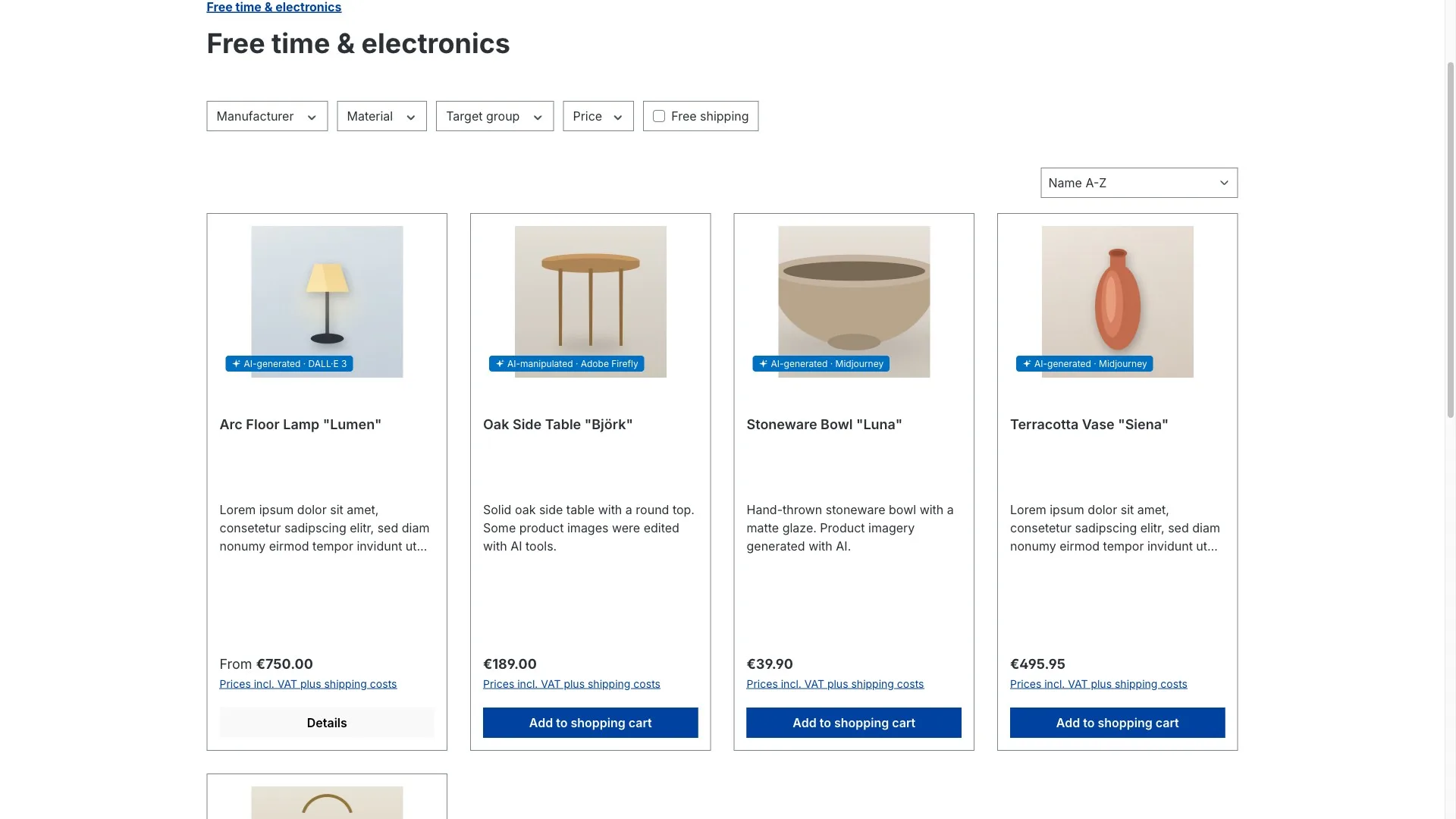
What the plugin covers:
- Labels at every rendering position. Listing, product detail page, image zoom, shopping experience pages, native video as well as embedded YouTube and Vimeo video. Plus a summary disclosure on the product page that also covers audio content.
- Chatbot notice and text notice. For AI assistants in the storefront and for AI-assisted product copy – the text notice is deliberately off by default, so you decide whether you need it.
- Deeply configurable, per sales channel. Badge text, status labels, colours, size, style (icon, text or both), position, tooltip, custom icon, visibility per placement. You adapt the label to your design instead of your design to the label.
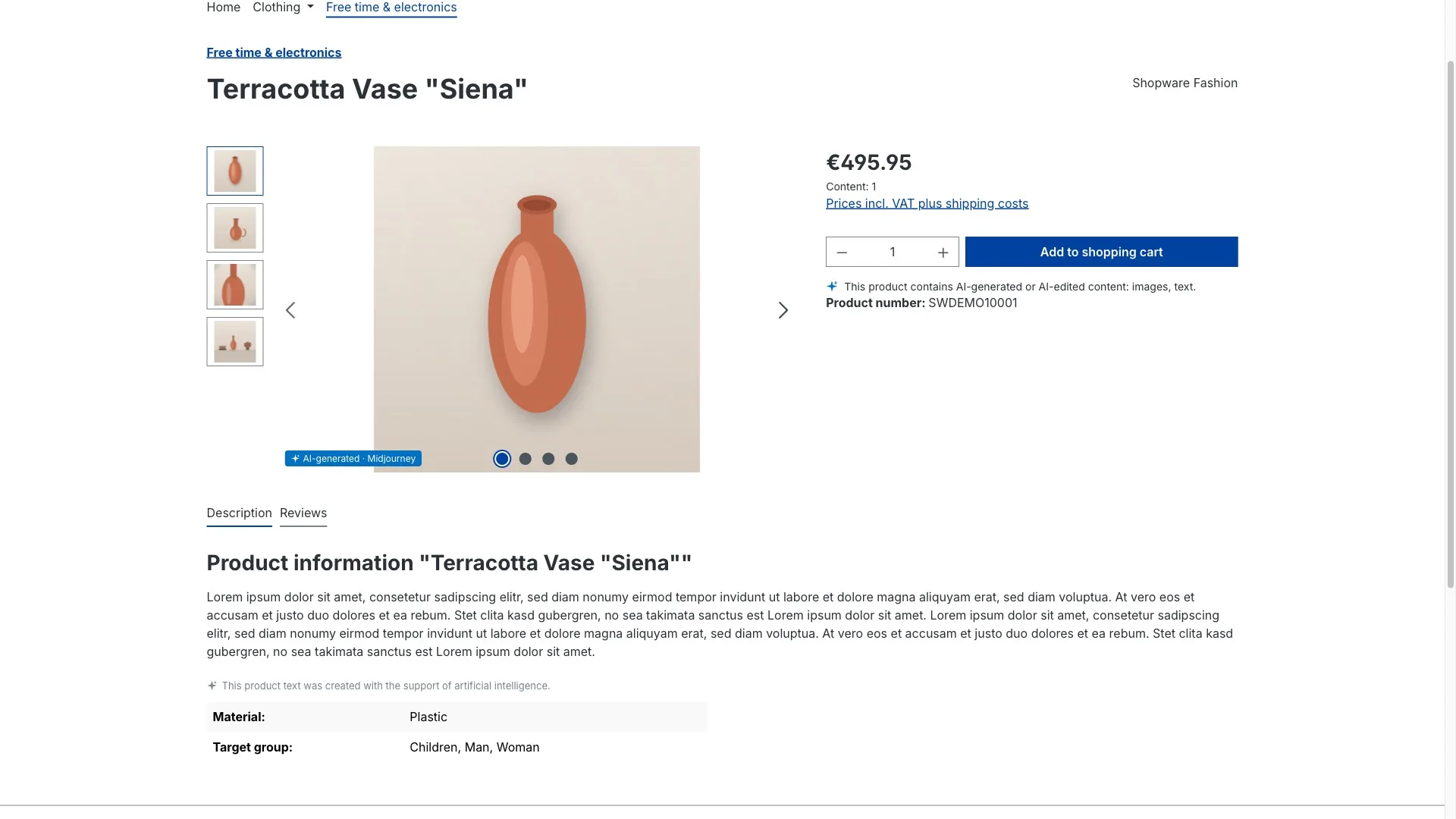
The part that makes the difference day to day: once it's configured properly, it largely runs by itself. You set defaults per media folder so new uploads are classified correctly from the start. A scan reads C2PA and IPTC metadata and proposes classifications – and if you want, it applies them automatically above a confidence threshold you define, with everything below landing in a review queue. A Flow Builder action and a coverage warning make sure gaps surface to you before they surface to someone else.
One thing we deliberately did not build: automatic AI detection based on heuristics. No algorithm can reliably tell whether an image was AI-generated – and a false negative is precisely the risk you're trying to get rid of. The decision stays with you, documented and traceable.
For evidence there's a coverage dashboard, a complete change log with undo, an AI register as PDF or CSV, and a compliance dossier as PDF. Technically everything runs locally in your shop – no external services, no extra cookies. The default colours meet WCAG AA contrast, badges are click-through and labelled for screen readers, there are ACL permissions and a clean uninstall. German and English are both included.
The plugin is now available directly in the Shopware Store. You can review the features, compatibility and purchase options there. How we approach Shopware plugins in general – from the idea to the store release – is on our services page.
Sources
Every legal statement in this article can be checked against the original (as of August 2026):
- Regulation (EU) 2024/1689 (EU AI Act), Art. 50 and Art. 113
- European Commission: Code of Practice on Transparency of AI-Generated Content
Wrapping up
AI labelling isn't an abstract future topic any more; it has been law since 2 August 2026. The Commission's guidelines are out, the Code of Practice has been assessed, the fine provision is in place. At the same time, implementing it in a normal online store is entirely doable – as long as you approach it systematically instead of image by image.
The three steps that matter: know what's AI (inventory and classification), show it everywhere (at every rendering position, not just the product page) and be able to prove it (register, log, dossier). In that order.
Not sure how much AI content is actually sitting in your store – or how to label it without ruining your design? Then let's take a look together in a free initial consultation. We'll do an proper check of your store, tell you where the real gaps are, and show you the plugin live. No obligation, no sales pressure – and afterwards you'll know exactly where you stand.