Managing warranty claims in Shopware: choice of remedy, deadlines, proof
12 min read
by Marcel, Senior software engineer
A customer writes in: "After four months the battery doesn't last a day." The email lands in the shared inbox. Someone replies, someone else adds a row to the claims spreadsheet, the workshop colleague gets a forward. Two weeks later the customer asks for an update – and nobody can say off the top of their head whether anyone ever told her she gets to choose between repair and replacement. That's the moment a service topic turns into a compliance topic.
The short version
- The short answer: A defensible claims process needs four things: log the claim, tell the customer about their choice between repair and replacement, document the remedy they picked, and record the closing plus deadlines – each with a timestamp.
- The real problem: Not the individual case, but the proof. What you did only counts in a dispute if you can show when you did it.
- Why spreadsheets break: Inbox plus table gives you no history, no reminder for cases left sitting, and no self-service status for the customer.
- The fix: In Shopware, our plugin Right to Repair & EmpCo: Claims and Repairability maps the whole thing as a guided four-status workflow – including an activity log, status emails and a self-service view in the customer account.
One thing upfront: we're software engineers, not lawyers. What follows is how we see it from project practice, and it is not legal advice. For a binding assessment of your case, talk to a law firm specialising in IT and consumer law. What we can help with is the organisational and technical side – and in our experience that's where things actually fall apart.
What a claims process has to deliver today
Since the right-to-repair package, what changed isn't so much whether you owe a remedy – it's how much communication and documentation hangs off it. We unpacked the substance in Right to repair in your online store. For the process inside your store, five stations remain:
-
Log the claim. Who is reporting what, for which order line item – and for how many units? "Two of four defective" is a different case from "all of it broken".
-
Inform about the choice of remedy. The customer decides between repair and replacement. The fact that you told them is the part you have to be able to prove later – with a date.
Being complete means more than "you get to choose": you may refuse the customer's chosen remedy only under narrow conditions, such as disproportionate cost. The remedy must be free of charge and delivered within a reasonable time and without significant inconvenience, and you carry the necessary expenses such as shipping and labour. Since the right-to-repair package, a repair also extends the liability period once by twelve months — how to calculate that correctly is in warranty extension after repair.
-
Document the chosen remedy. Repair or replacement, decided when, by whom.
-
Close out and update deadlines. After a repair the warranty gets extended – we run through the maths in Warranty extension after a repair. What matters here: the new end date has to sit somewhere findable eighteen months from now.
-
Keep the customer posted. Not out of politeness, but because every "any news?" email costs handling time you need elsewhere.
None of this is rocket science. It's just nothing an inbox can do on its own.
Why inbox plus spreadsheet breaks down
In our projects we see the same four failure points every time:
No proof. A sent email in colleague A's mailbox isn't process evidence. It's also gone when colleague A leaves or the mailbox gets cleaned out. The timestamp "notice given on 12 Sep" belongs on the case, not in a mail folder.
Missed deadlines. A case sitting untouched for two weeks doesn't announce itself in a spreadsheet. There's no row that turns red. There's only a customer who eventually gets impatient – or worse, stops asking and writes a review instead.
Team chaos. Who's handling which case right now? Two replies to the same customer with different answers isn't a freak accident, it's the logical result of having no shared view.
Constant follow-ups. "What's the status?" is the single most common question in claims support – and the only one you can automate away entirely, by letting customers look it up themselves.
- statuses a claim should cleanly move through
- 4
- months of warranty after a repair – when the conditions are met
- +12
- a sensible threshold after which an untouched case counts as overdue
- 14 days
The process as four statuses – how chaos becomes a workflow
The trick is to stop thinking of the process as a pile of emails and start thinking of it as a state machine. Four statuses are plenty:
| Status | Meaning | What gets recorded |
|---|---|---|
| Reported | The case is logged, nothing has happened yet. | Order, line item, affected quantity, report date |
| Notice given | The customer knows they can choose repair or replacement. | Timestamp "notice given on" |
| Remedy chosen | It's settled: repair or replacement. | Chosen remedy + timestamp |
| Completed | The case is done. | Repair date, new warranty end date if applicable |
The crucial difference to a spreadsheet row: every transition automatically produces an entry – who, when, from which status to which, with the relevant extra data. You don't "document" anything, you just work, and the documentation happens as a by-product. It has to work that way, otherwise it won't happen in real life.
Our answer: our Shopware plugin "Right to Repair & EmpCo"
That's exactly the process we built as a Shopware plugin: Right to Repair & EmpCo: Claims and Repairability. It lives in the admin under Orders → Claims and gives you two views on the same data – a list for sorting and searching, a board for working.
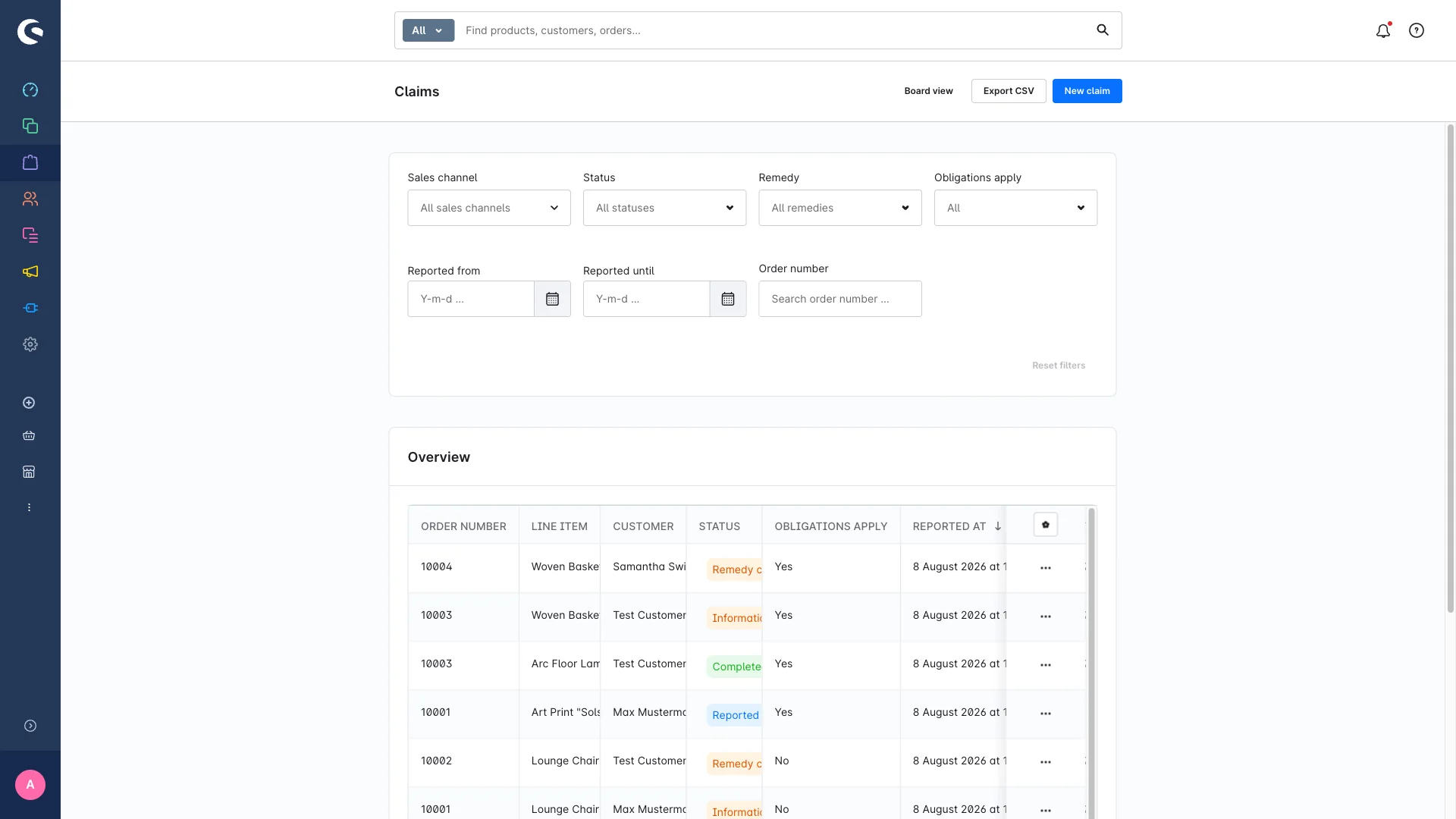
The columns are deliberate: notice given on and warranty extended until sit right in the overview, because those are the two facts people ask about later. Filters narrow things down by sales channel, status, chosen remedy, eligibility or a date range; search runs on the order number.
The board for day-to-day work
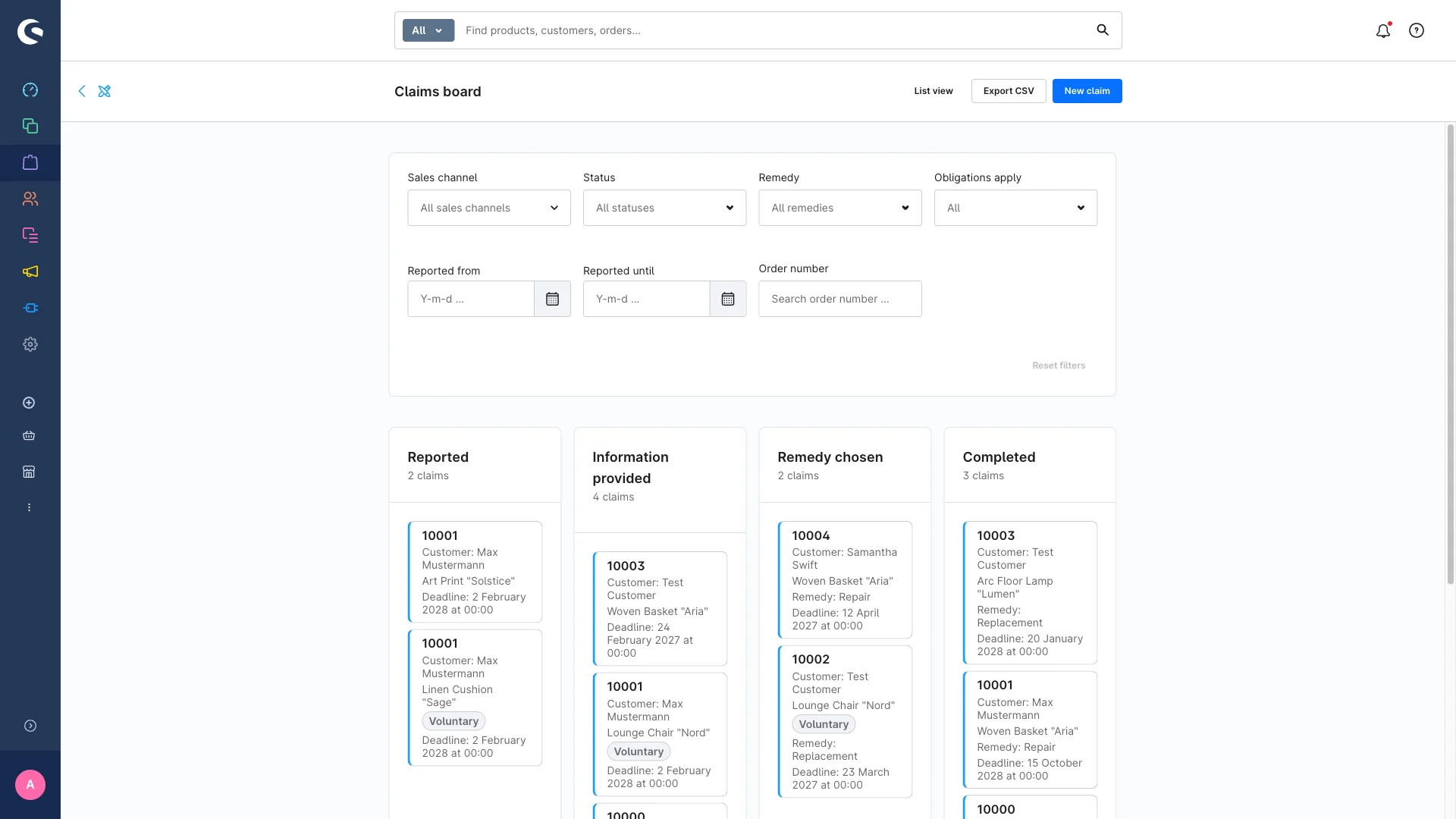
Each card shows the customer, the relevant deadline and, once it's settled, the chosen remedy. If a case isn't eligible because the order predates your cut-off date, the card carries a "voluntary" badge. So you can see at a glance where you're being generous and where you're obliged.
One detail we built on purpose: moving a card on the board does not send an email automatically. You have to opt in. On the detail page with the guided buttons it's the other way around – there, the step triggers the matching email. Tidying up your board therefore won't accidentally fire twenty notifications.
Communication that takes care of itself
Four customer emails hang off the workflow: the notice about the choice of remedy, the confirmation of the chosen remedy, the handling instructions (return address, procedure, duration) and the completion confirmation, which mentions the extended warranty where relevant. All of them are regular Shopware mail templates – you edit them with your placeholders, exactly like your order confirmations. A dedicated reply-to address makes sure customer replies land in the right inbox instead of the store default.
Top tip
Before you click "send instructions" for the first time: open the "Subsequent performance: handling instructions" template in the mail template manager and replace the placeholders in square brackets – return address, procedure, processing time. No plugin can guess those, and without editing they go out verbatim. The built-in email preview lets you see all three customer emails rendered with the real data of an actual claim, without sending anything. Ten minutes of prep that save you one embarrassing email to a hundred customers.
Customers can see their own status
The biggest time sink in claims support is follow-up questions. So customers get their own "Claims" entry in their account: a table with order number, line item, status as a badge, report date and every known deadline – notice given on, remedy chosen on, repair completed on, warranty until, and extended warranty until.
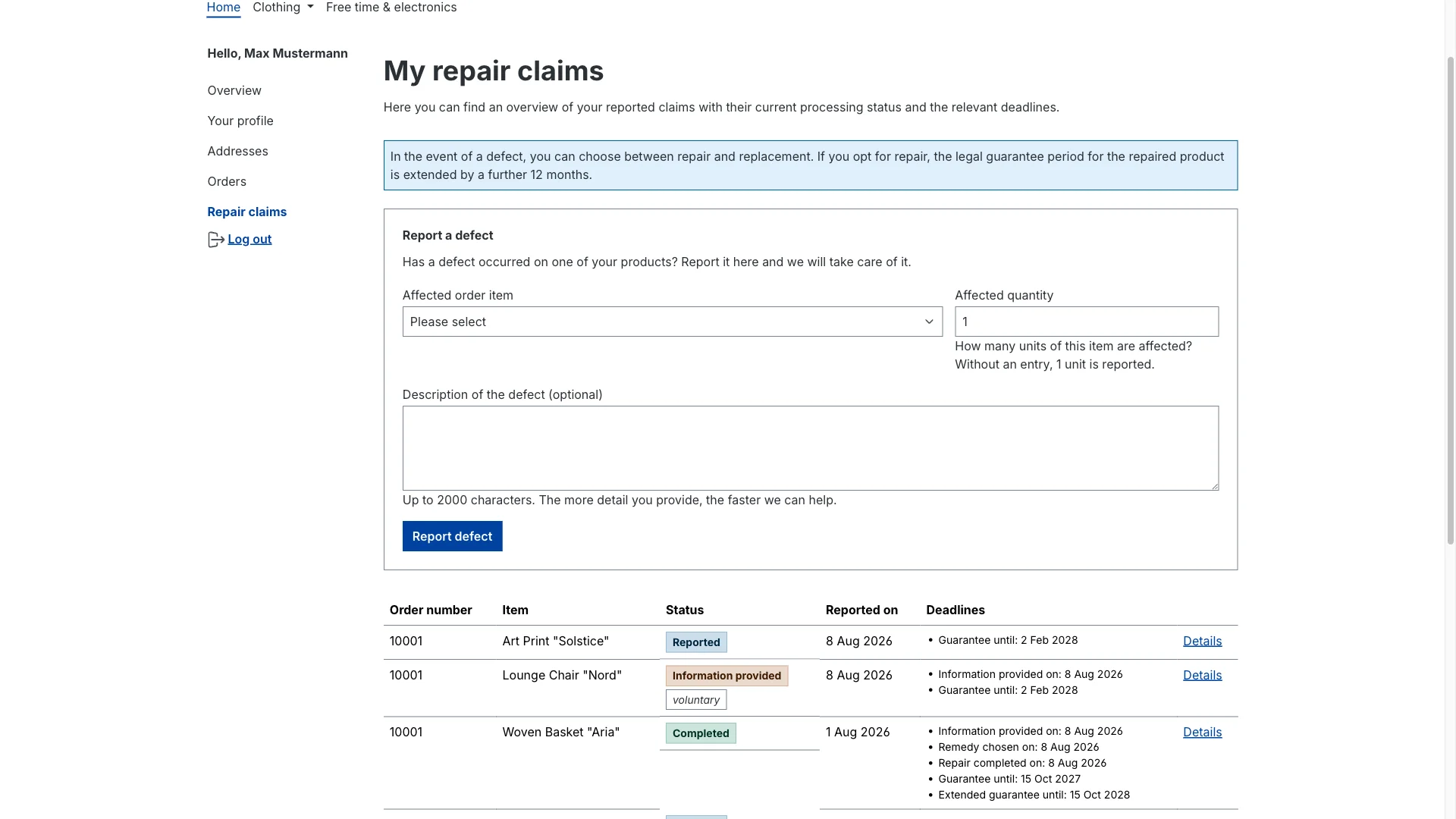
And it goes further: when a case sits at notice given, the customer sees two buttons – "choose repair" and "choose replacement" – and makes the decision themselves. That path is fully equivalent to the click in the admin: same status change, same timestamp, same log entry, same confirmation email. The notice email links straight there with a button, so your team doesn't have to chase anyone.
Snippets let you adapt the intro text, the remedy notice, the status labels and two "what happens next?" notes to your own wording – that's where your logistics details belong.
Nothing sits, nothing gets lost
Three mechanisms keep the process alive even in a hectic week:
- Reminder for open cases. A daily check flags claims that have been sitting in "reported" for more than the number of days you set, without a notice being given (default: 14 days, 0 turns it off). The team gets an admin notification; optionally an email goes to an address you configure – deliberately without any customer data, just the count.
- Activity log. Every status change automatically creates an entry with the action, the previous and new status, and the extras: which remedy, whether an email went out, whether the extension was applied.
- Timestamp beats email delivery. On the "give notice" step the compliance timestamp is always set – even if the email fails to send. You get a warning and can follow up manually, but your record stays complete. That's a deliberate design decision: a flaky mail server must not punch a hole in your documentation.
Who may do what – and what gets deleted
For teams the plugin ships its own permission group with the four familiar Shopware levels: view, edit, create, delete. Management gets read access, support gets view plus edit and create where needed. Hand out the delete right sparingly – claims are your compliance documentation. Without the edit right the workflow steps are visible but not executable.
Conversely, you also need to get rid of data again. That's what the retention period for completed claims (months) setting is for: after the period you define, completed cases are deleted automatically along with their log (default 0 = nothing gets deleted). The log entries themselves are cleaned up by a scheduled task after six months anyway. That turns GDPR storage limitation from an intention into a checkbox.
Configured properly, it largely runs by itself
That's the part that matters day to day. Once it's set up, the process isn't an extra step any more – it's simply how the work flows. And the setup is as granular as it needs to be:
- Per sales channel. The entire configuration is set per sales channel. One channel on, another off – or different cut-off dates per target country: all possible.
- Cut-off date and deadlines. The cut-off date for the remedy obligations is preset to 31 July 2026, the base warranty to 24 months, the extension after a repair to 12 months. All of it editable; for individual countries you store deviating warranty durations in a separate table that then takes precedence.
- Eligible or voluntary. When a claim is created, the plugin compares the order date to the cut-off date and flags it accordingly. Older orders count as "voluntary" by default – you can still push them through the whole workflow, but you don't get an automatic extension forced on you.
- Texts and emails. Consumer-facing text runs through snippets, customer emails through the normal mail template manager. Both stay untouched by updates once you've customised them.
- Create claims automatically. If you don't want to log claims by hand at all: a Flow Builder action creates cases automatically – for example as soon as an order reaches a certain return status. The other way round, every workflow step is available as a flow trigger for your own emails, tags or webhooks.
In short: you decide once what your process should look like. After that either the customer or a flow logs the case, your team drags cards across the board, the emails go out on their own, the timestamps write themselves – and cases left sitting speak up by themselves.
Checklist: is your claims process defensible?
- For any claim from last quarter, can you say in under a minute when the customer was informed about their choice of remedy?
- Is the new warranty end date after a repair stored somewhere a colleague will still find it in two years?
- Does anyone notice when a case sits untouched for two weeks – without someone going looking for it?
- Can the customer check their status without writing to you?
- Does everyone on the team know who is handling which case?
- Is there a rule for when old claim data gets deleted – and does it enforce itself?
If you hesitate on more than two of those, that's not a discipline problem. It's a tooling problem.
Sources
The legal statements in this article, in the original (as of August 2026):
- Section 439 German Civil Code (BGB) — remedy
- Section 438 BGB — limitation of claims
- Directive (EU) 2024/1799 (right to repair)
Wrapping up
Since the right-to-repair package, warranty claims aren't just a service case any more – they're a documented procedure with deadlines attached. The good news: the process is manageable – intake, notice, choice, closing – and it maps cleanly onto Shopware. What matters is that the documentation emerges as a by-product of normal work rather than as an extra chore. Otherwise it's full of holes again three months in.
The plugin is coming soon to the Shopware Store. If you don't want to wait: take a look at the plugin page and get in touch via our contact form – we'll give you early access and set it up with you. How we approach Shopware plugins in general – from idea to store release – is on our services page.
Not sure your current claims process would survive a single pointed question? Then let's look at it together in a free initial consultation. We'll walk through your workflow, tell you honestly where the gaps in your evidence are, and show you the plugin live on your store. No obligation – and afterwards you'll know exactly where you stand.