Right to Repair & EmpCo: Claims and Repairability
Right to repair and EmpCo product info in your Shopware shop – a guided claims workflow in the admin, repair details on the product page. Two new sets of duties, one tool: a guided claims workflow with complete evidence, and repair information on the product page – instead of a spreadsheet and theme hacks.
- Two sets of duties in one plugin: right to repair (default cut-off 31 July 2026) and EmpCo product page info (default cut-off 27 September 2026)
- A guided remedy workflow with four statuses – including timestamped proof that you told the customer about their choice of remedy
- Mostly runs by itself once set up: deadlines, +12 months of warranty after a repair, status emails, reminders, deletion periods
- Everything configurable per sales channel – it ships switched off, and the onboarding checklist walks you through setup
Coming soon to the Shopware Store – if you’re interested, just get in touch and we’ll let you know · Built by Viovenia · configurable per sales channel · not legal advice, every text is a sample · Shopware 6.7
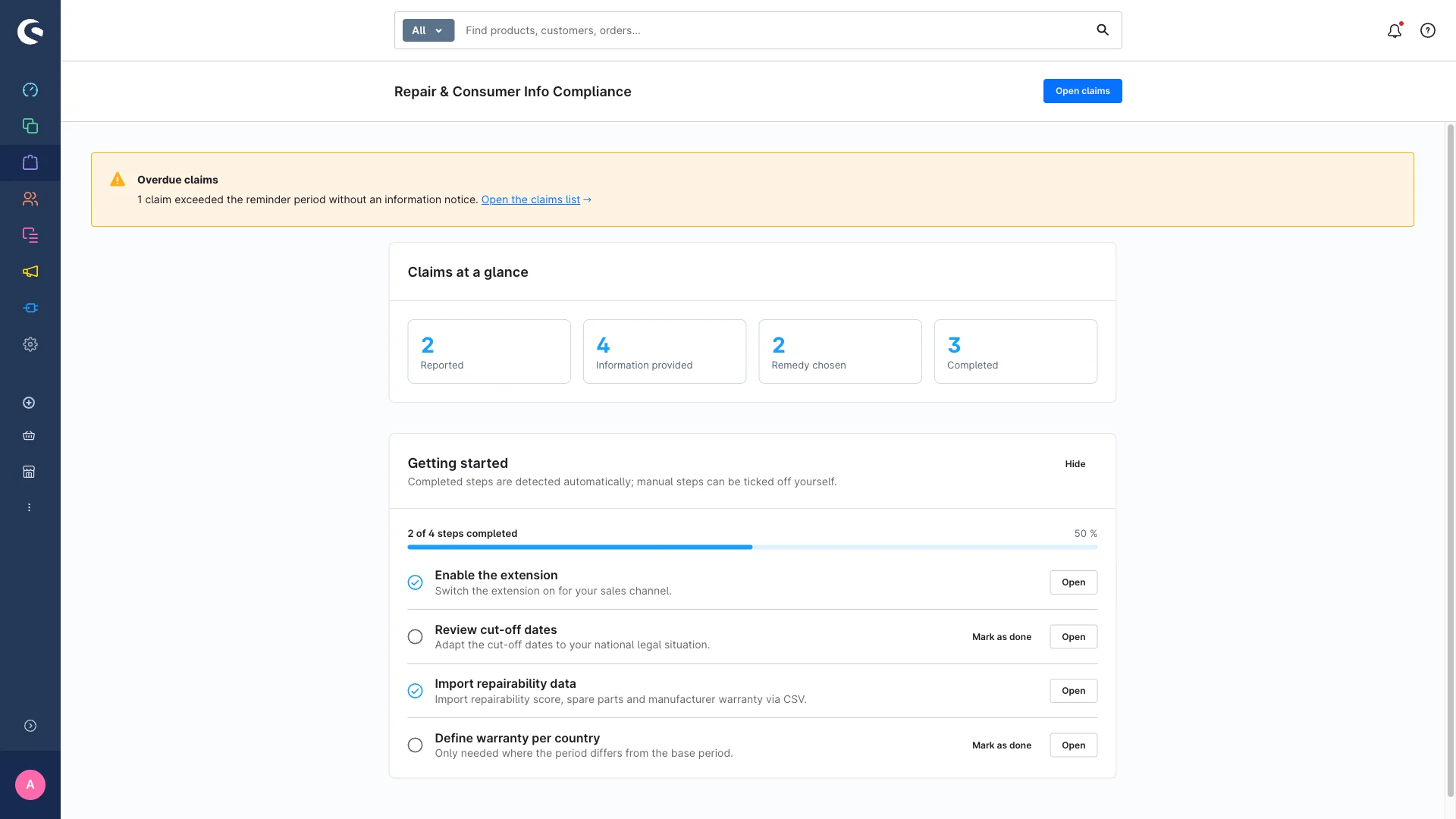
Your starting point in the admin: key figures, module status and a checklist that walks you through setup.
Why you need this
In theory you can handle both sets of duties by hand – right up until the first claim disappears in your inbox or somebody asks you for proof.
The duties are here
For the right to repair (Directive (EU) 2024/1799) the default cut-off is 31 July 2026: when a defect appears within the statutory warranty you have to tell the customer about their choice between repair and replacement, and after a repair the warranty extends by twelve months, once. From 27 September 2026 the pre-contractual product information from the EmpCo Directive (EU) 2024/825 joins it. Both dates are defaults – national implementation may differ.
Without proof it gets uncomfortable
The choice-of-remedy notice is worth little if you cannot show, in a dispute, that it was given and when. Missing or wrong product page details are just as risky: consumer information duties are classic warning-letter territory, and one attentive competitor is enough. The plugin sets a timestamp on every step and logs every change – even when an email fails to go out.
Doing it by hand costs you time every day
Without a tool that means a spreadsheet nobody maintains, deadlines missing from the calendar, warranty dates somebody has to recalculate, and product page copy hacked into the theme and touched again after every update. None of it scales past a handful of claims a month.
What the plugin takes over
Configure it properly once and the rest largely runs by itself: the cut-off check on the order date, deadline calculation, the one-off +12-month extension, status emails, reminders about claims left sitting, the activity log, showing the product page block from the cut-off date and deleting completed claims after your retention period. It does not replace legal advice.
Am I affected? The 60-second check
Four questions about your shop – then you know which of the two sets of duties applies to you.
Question 1 of 4
Do you sell to consumers in the EU?
Question 2 of 4
Do you sell physical goods covered by the statutory warranty?
Question 3 of 4
Are your product pages missing details on repairability, spare parts or manufacturer guarantees?
Question 4 of 4
Do you handle claims by email and spreadsheet, with no documented choice-of-remedy notice?
Ready to go in four steps
Setting it up is a one-off job – after that the plugin handles deadlines, extensions, emails and reminders on its own.
- 1
Install & switch on per sales channel
Install the extension, activate it – then arm it per sales channel. It deliberately ships with everything off, so you decide where and when it starts. The workspace lives in the admin under Orders → Warranty claims.
- 2
Check cut-off dates and warranty periods
The “Getting started” card guides you through setup: check the cut-off dates (31 July 2026 and 27 September 2026 by default), set the base warranty period and add country-specific deviations. From there the plugin calculates every deadline itself.
- 3
Maintain your product data
Enter repairability score, spare part details and the manufacturer’s repair link on the product, or import them as a CSV – dry run included. For whole manufacturers you can store default values that fill in wherever the product itself says nothing.
- 4
Process your claims
Create a claim (or let the customer report it), give the notice, confirm the remedy, complete it. Timestamps, the extension, emails and the log happen on the side – you handle the actual case.
What Right to Repair & EmpCo: Claims and Repairability does
Warranty claims with four clear statuses
Every claim takes the same route: reported → notice given → remedy chosen → completed. Each button is only active from the matching status, so nobody skips a step. For corrections you can still set the status freely.
Proof that you gave the notice
The “Give notice” step sets the “notice given at” timestamp – always, even if the email fails to send. That timestamp is your evidence that the customer knew about their choice between repair and replacement, and when.
The warranty extends itself
After a repair the plugin adds 12 months to the warranty, once – automatically, and only when the conditions hold (repair chosen, claim eligible, not extended yet). It calculates from the base warranty period per sales channel, and a country-specific period takes precedence.
The cut-off date decides what applies
When a claim is created the plugin compares the order date against the cut-off for remedy duties (default 31 July 2026, adjustable per sales channel). Older orders run as “voluntary” – you can still process them, without the duties and without the extension.
Board, list and reminders
The list view for sorting and searching, the Kanban board for dragging claims along – both with the same filters (sales channel, status, remedy, date range). If a claim sits too long without a notice, the plugin flags it in the admin every day and optionally by email.
Your customers can help
In their account, customers see their claims with status and deadlines, report a defect themselves through a form, and pick repair or replacement directly once the notice has been given. That choice is equivalent to the one in the admin: same log entry, same confirmation email.
A “Repair & warranty” block on the product page
Repairability score with scale and source, an optional label image, spare part availability, a link to the manufacturer’s repair page and a warranty notice – every element can be switched off individually. The block only appears from the EmpCo cut-off date and only for products where you maintained the data.
CSV import with a dry run instead of endless clicking
Maintain repairability data and whole batches of claims by CSV: download the template, fill it in, run a dry run (validates without saving), import. Repeat imports update instead of duplicating – and the export hands both data sets back for editing.
User permissions and clean deletion periods
A dedicated “Repair compliance” permission group with view, edit, create and delete – support handles the cases, only a few can delete. Completed claims are deleted automatically after a period you set (GDPR storage limitation), the activity log after six months.
A look at the shop and the administration
What your customers see and how you work behind it – all inside the Shopware admin you already know, no extra tool.
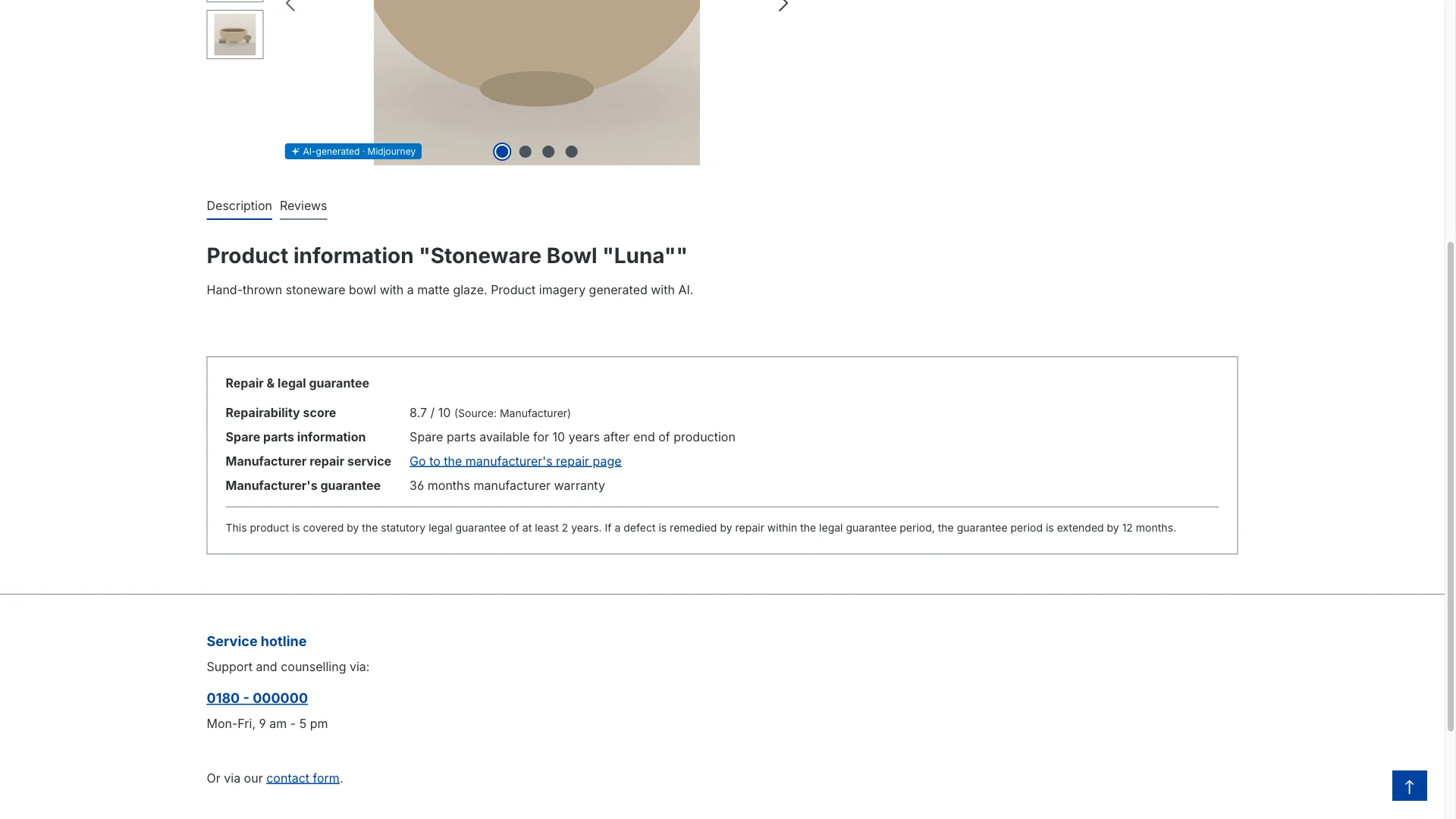
The info block on the product page – only from the cut-off date, and only where data is maintained.
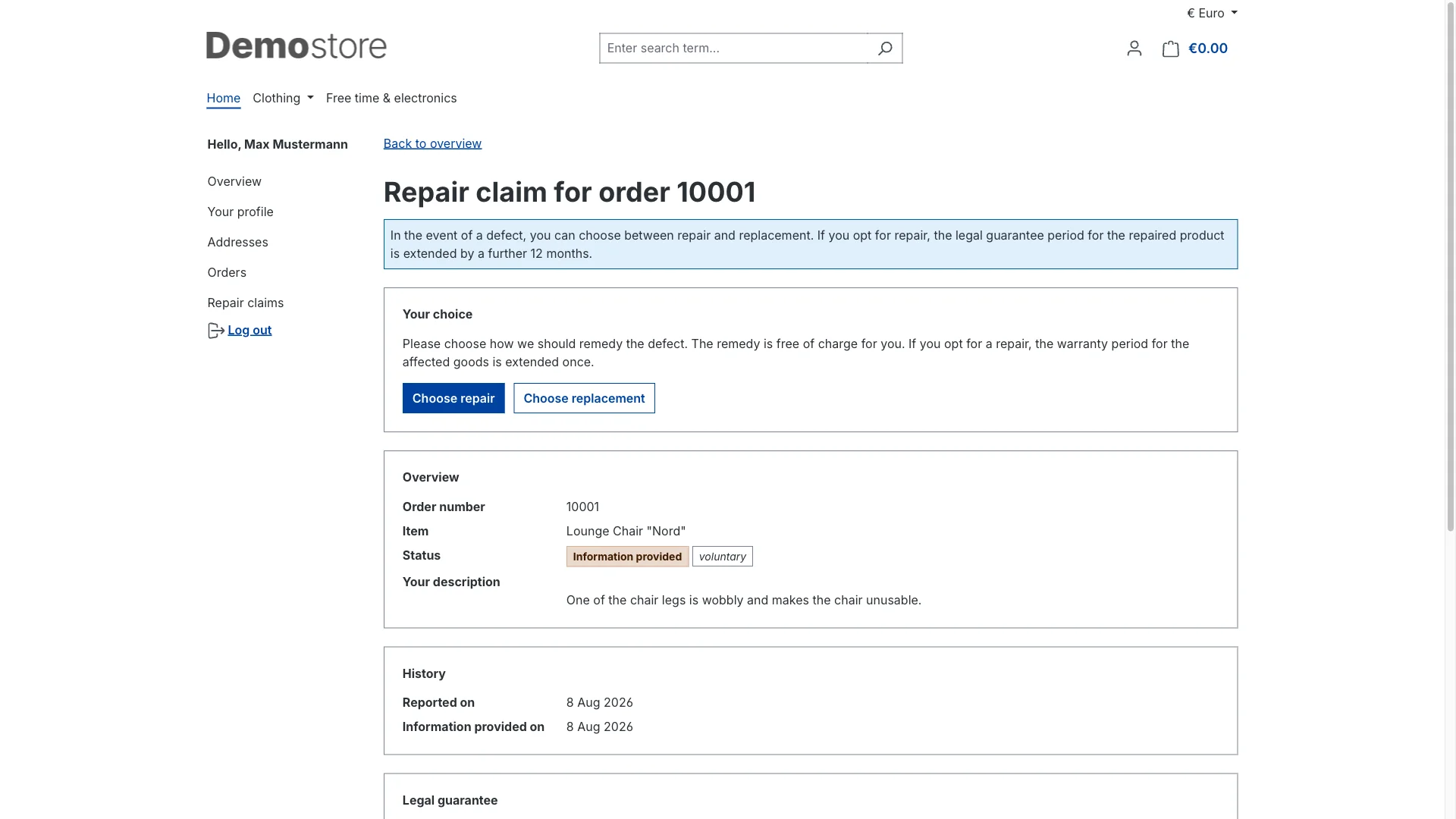
Customers pick repair or replacement themselves – equivalent to the admin choice, log entry included.
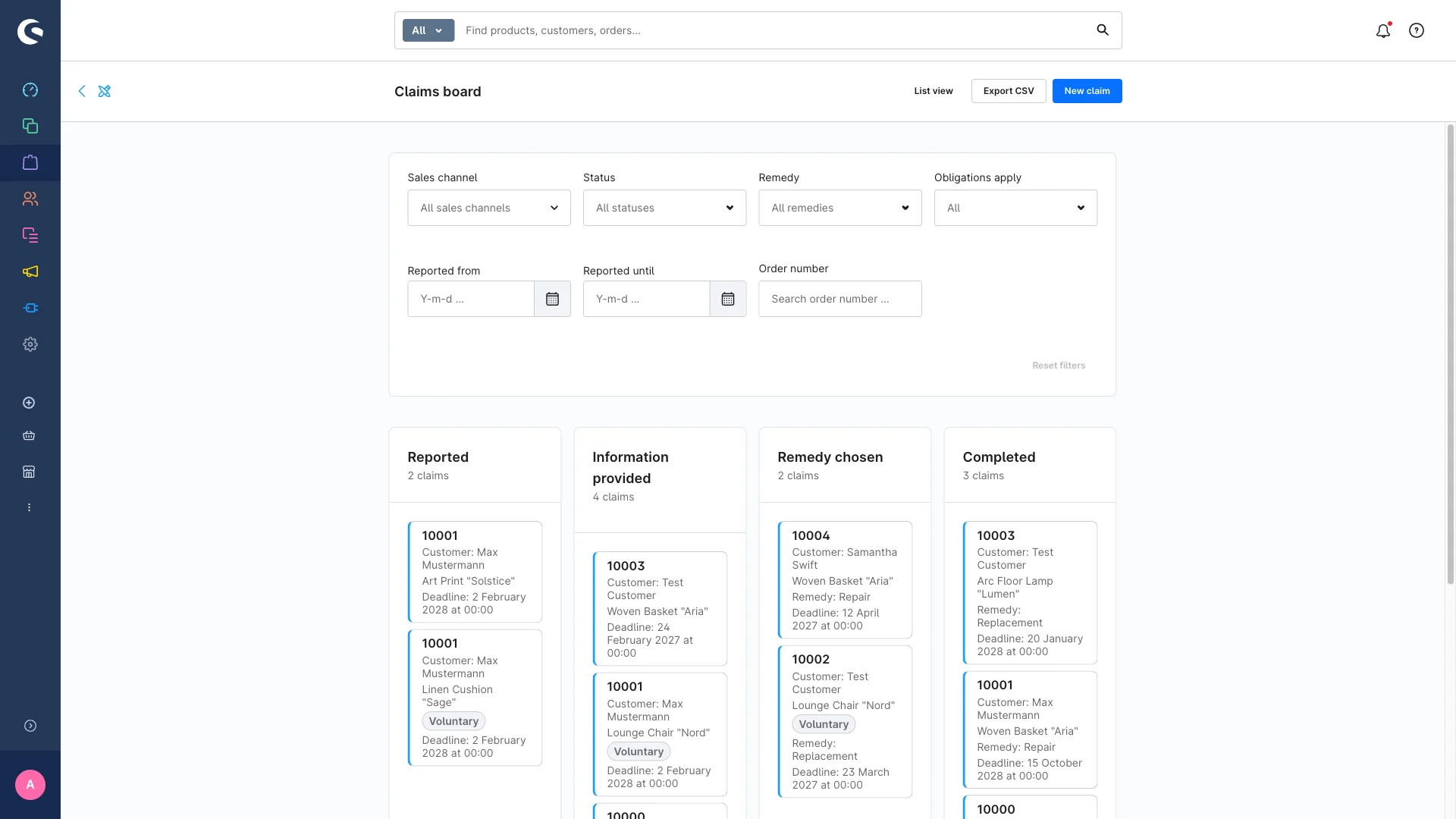
The board shows every case at a glance – change status by drag and drop, forwards and backwards.
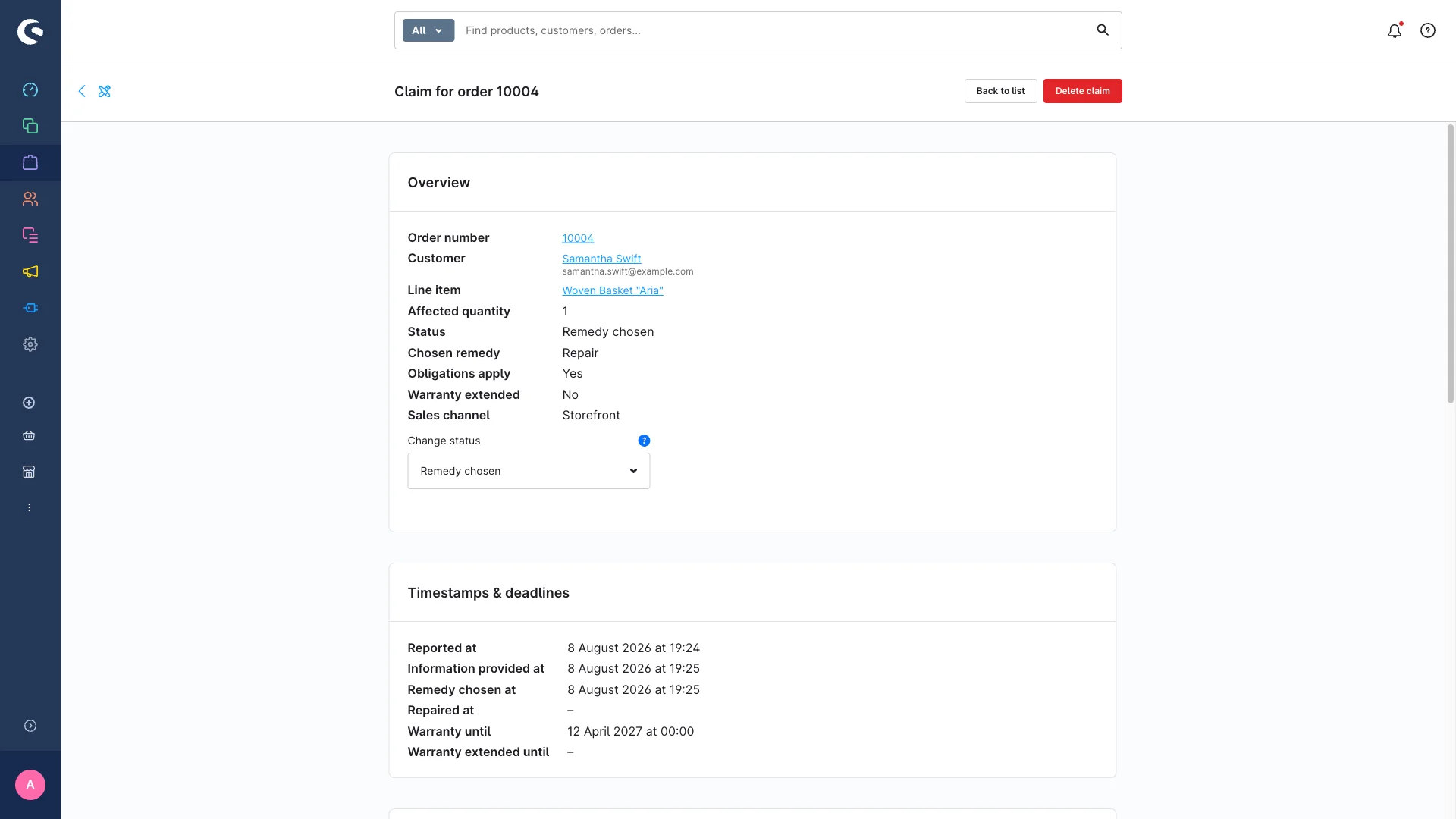
Every step sets its timestamp – your proof that the choice-of-remedy notice was given.
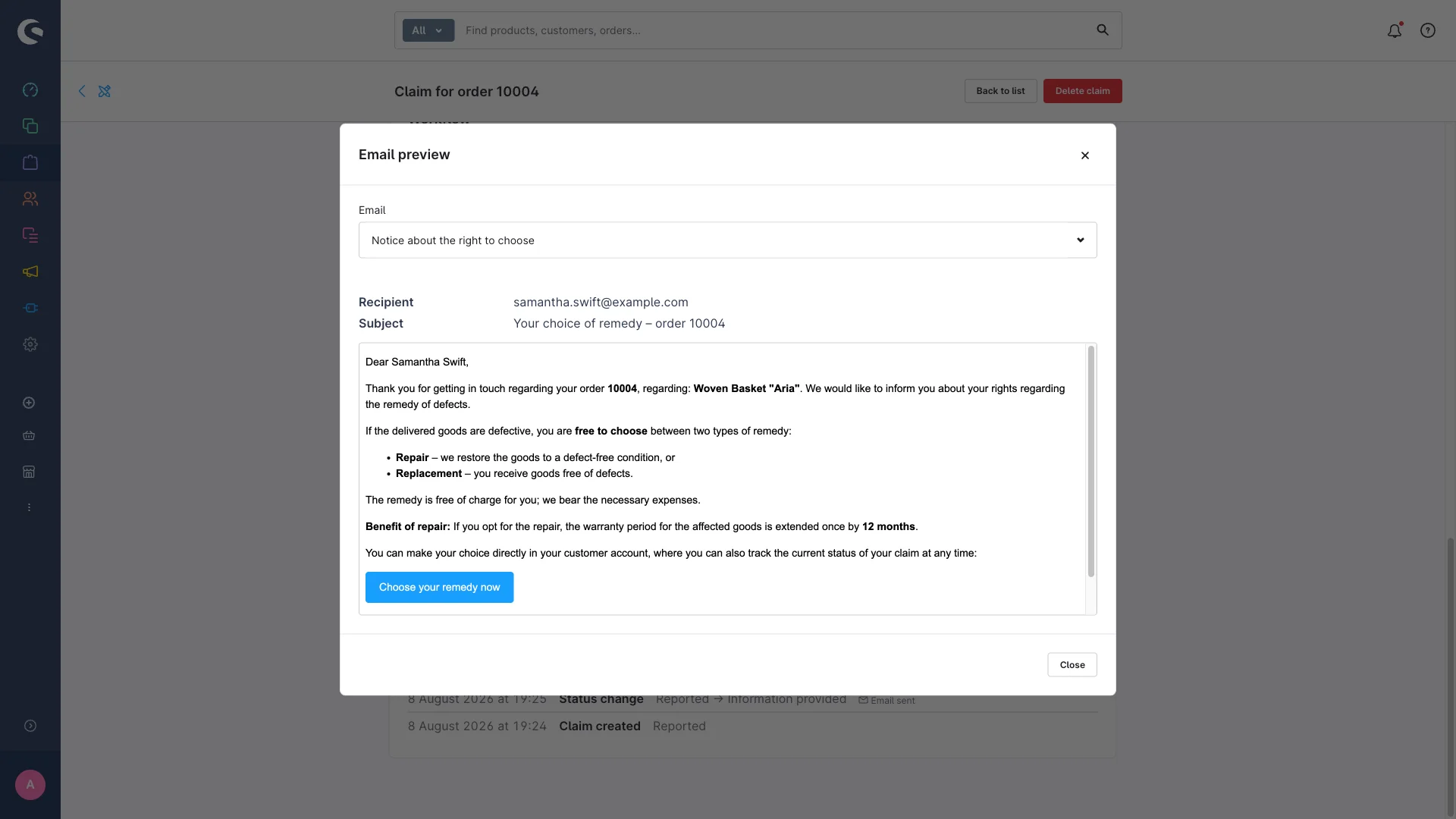
The email preview shows you the real content with real data – before anything is actually sent.
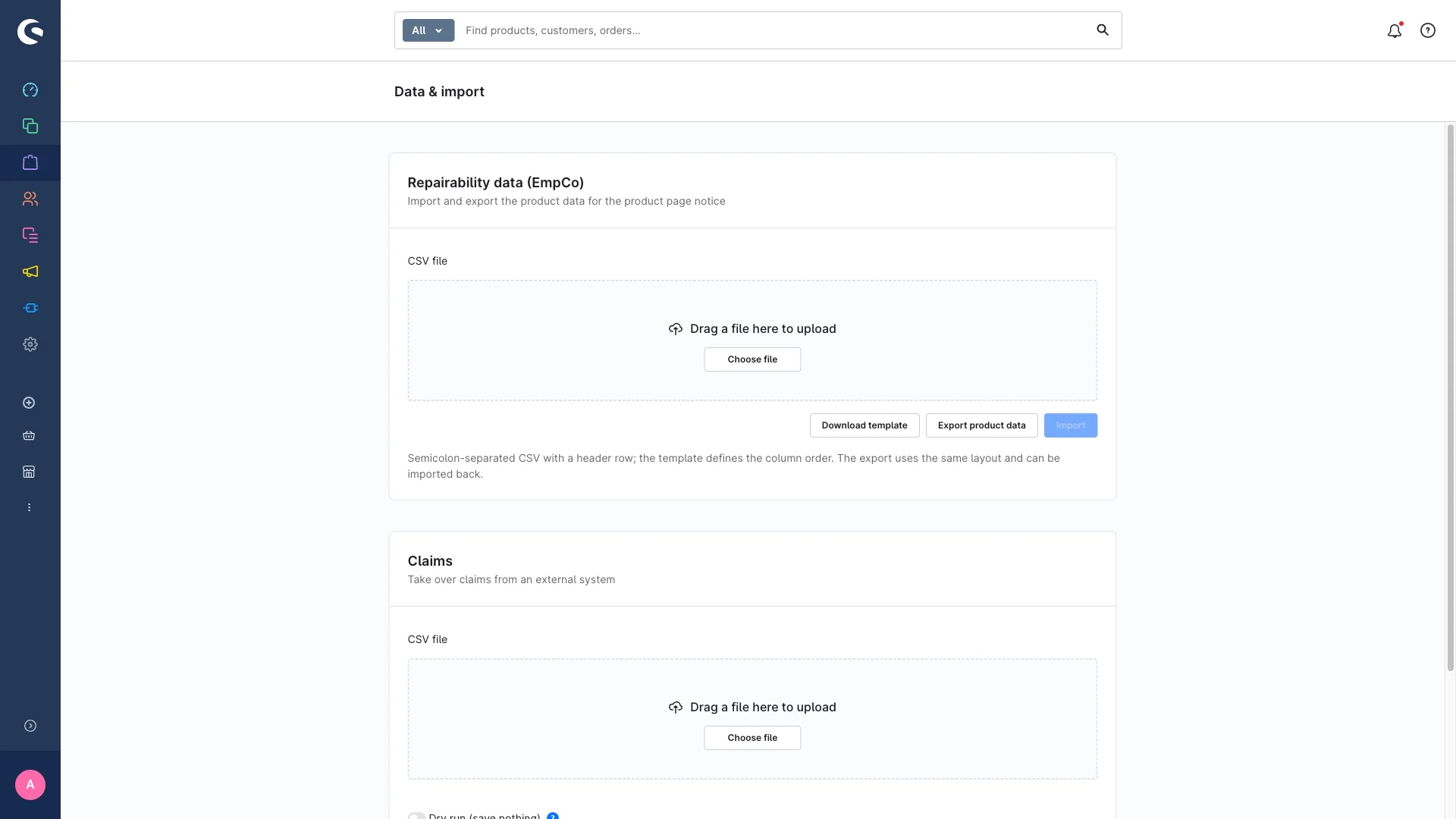
Download the template, run a dry run, import – risk-free, because a dry run saves nothing.
Organise it yourself – or use the plugin?
A spreadsheet for the claims and a few lines in the theme sound like an afternoon of work. But the effort isn’t in setting it up – it’s in every day afterwards, and in the proof when somebody asks.
With a spreadsheet and theme changes
- Claims in Excel: deadlines in your head, warranty dates recalculated by hand, nothing reminding you about cases left sitting
- No solid evidence: when exactly was the choice-of-remedy notice given – and what do you show in a dispute?
- Product page info built into the template: touched again after every theme update, with cut-off and empty-data logic you write yourself
- Customer account, status emails, permissions and deletion periods all still come on top
Right to Repair & EmpCo: Claims and Repairability
- A guided workflow with four statuses, board, list, filters and a daily reminder about overdue cases
- A timestamp on every step and an activity log that records each change with its context
- The product page block without theme code – automatic from the cut-off date, only where data exists, every element switchable
- Customer account view with self-reporting, an ACL permission group, editable sample texts and automatic deletion after your retention period
And if national implementation brings different cut-off dates, you change one date in the configuration – per sales channel, without a line of code.
Coming soon to the Shopware Store – interested?
“Right to Repair & EmpCo: Claims and Repairability” is about to be released. Drop us a line if you want in early – and in the meantime, the full documentation is already there to read.
Frequently asked questions
- From when does the right to repair apply to my shop?
- The remedy duties from Directive (EU) 2024/1799 apply to contracts from the cut-off date onwards – the plugin ships with 31 July 2026 as the default cut-off. National implementation may differ, which is why you can set the date yourself per sales channel. When a claim is created, the plugin compares the order date against that cut-off and marks the case as eligible or voluntary.
- What has to be on the product page from 27 September 2026?
- The EmpCo Directive (EU) 2024/825 requires clearer pre-contractual information – among other things about repairability and guarantees. The plugin displays the “Repair & warranty” block for that: repairability score with scale and source, an optional label image, spare part availability, the manufacturer’s repair link and a warranty notice. 27 September 2026 is the default cut-off and adjustable per sales channel; national implementation may differ.
- What actually runs automatically – and what stays my job?
- Automatic: the cut-off and deadline calculation, the one-off +12-month extension after a repair, the status emails, the daily reminder about claims left sitting, the activity log, showing the product page block from the cut-off date, and deleting completed claims after your retention period. Your job stays the actual work – repairing or replacing, communicating – plus signing off on every text and cut-off date.
- Does the plugin email my customers on its own?
- Only when two things line up: the “Send notification emails” setting is on, and you trigger the matching workflow step. Nothing goes out without you. On the Kanban board, dragging a card sends no email at all unless you actively select it. The texts are samples and editable in the mail template manager; the email preview shows you what would arrive before you send. Switch sending off and the compliance timestamp is still set.
- Can I migrate claims from my old system?
- Yes, via CSV import. Download the template first so columns and format match, and use the dry run – it validates the file without saving anything and shows you row by row what would be created, updated, skipped or rejected. If a claim already exists for an order line item, it gets updated instead of duplicated. The export hands all claims back as a CSV, which is handy for your records.
- How exactly does the warranty extend after a repair?
- By 12 months, once, and only if three conditions hold: the chosen remedy was repair (not replacement), the claim is eligible, and no extension has been applied yet. The calculation starts from the order date plus the base warranty period (24 months by default); if you stored a different period for the destination country, that one wins. The new end date then appears in the list and on the detail page.
- Why doesn’t the product page block show up for some products?
- The block is deliberately shy: it only appears when the extension is active for the sales channel, the “Product page info” module and the block toggle are on, the EmpCo cut-off has been reached – and the product actually has data. Empty products get no empty block. That way you can prepare in peace without anything half-finished showing up in your shop.
- Should I switch on the “manufacturer repair obligation” badge?
- It is off by default on purpose. The badge points to a possible manufacturer repair obligation for certain Annex II product groups – but advertising a legal obligation that exists anyway can count as advertising the self-evident, and that is grounds for a warning letter in some markets. Only switch it on after talking to your legal counsel.
- Does the plugin replace legal advice?
- No. It is a tool for implementation and documentation: it gives you the workflow, the deadlines, the evidence and the display slots. Every text it ships is a sample you need to review and adapt, and the preset cut-off dates are defaults – national implementations may differ. The legal assessment of your specific case belongs with a lawyer. The plugin also deliberately does not check cascading liability for manufacturers based outside the EU.
Tell us about your project
Free intro call, no strings attached – we get back to you personally and quickly.