Software for your team
Internal web app development.
Built around how your team works.
Vacation requests by email, checks on paper, orders in a spreadsheet: Many workflows do not need a big system, just the right tool. We build web apps for your team with roles, company sign-in and connections to your existing systems.
Briefly describe your task. The first conversation is free and non-binding.

A tool for your team in the browser.
Concept illustration- Enter
- Decide
- See the status
Runs in the browser with no install.
A link on the intranet is enough. Updates reach everyone right away, with no app store and no rollout to each computer.
Permissions and sign-in fit your company.
Roles set who can see and change what. Sign-in can run through Microsoft 365 or Google Workspace.
Built for daily use.
Anyone opening a tool several times a day needs fast search, sensible defaults and bulk editing.
A guided form you can try yourself.
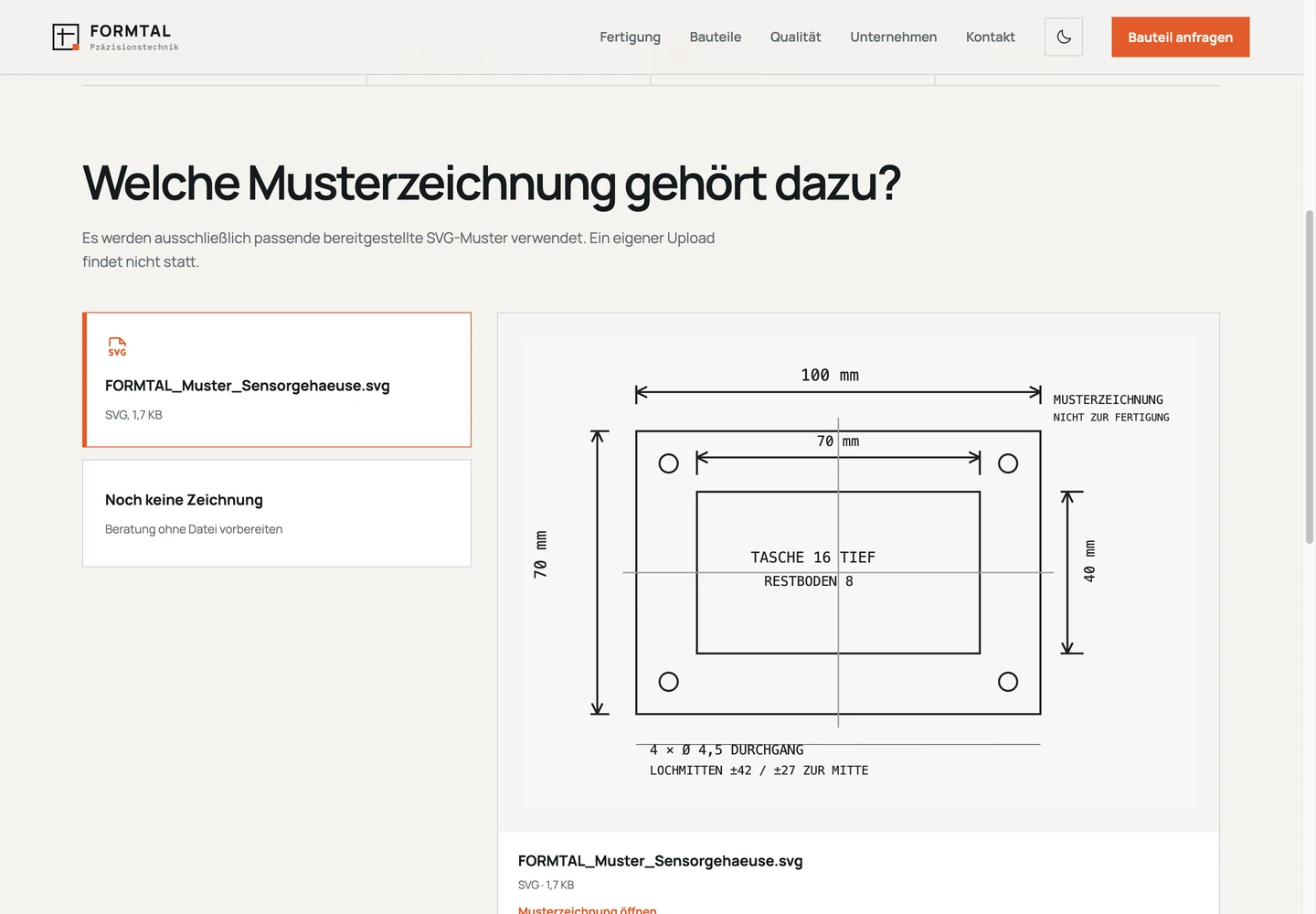
Our FORMTAL demo guides you step by step through a part inquiry with technical details and a sample drawing. Internal data capture can work the same way: The form asks only what each step needs and sums up the details at the end.
- Go through the inquiry from material to summary.
- Think about which steps your team would need in its own workflow.
Your task
Which workflow should run in the browser?
How we can help
Who decides what is in the system.
Vacation, purchases or complaints move through set steps. Everyone sees the status, and the application sends the reminders.
Describe a typical case from the request to the decision.
Ask about this taskYour selection is included in the contact form. The first conversation is free and non-binding.
How your internal web app comes together.
We plan it with the people who will use the tool every day.
Sort out workflow and roles
Who enters data, who decides, who reports on it? We record rules, data and existing systems.
Build a first version
Your team tests a complete workflow with sample data, on a computer and a phone. Feedback goes into the next round.
Roll out and support
We bring in existing data, introduce your team and agree on operations. The next workflow can follow after that.
You can tell it helps by follow-up questions, processing time and duplicate entry.
Know what you are commissioning.
We estimate a first version with one complete workflow. Roles, company sign-in, integrations and data import are listed as separate building blocks.
View pricing guidance
First version
One complete workflow with sign-in and a data model.
from €3,900excl. VAT
Broader application
Several areas, reports and data import within an agreed scope.
from €11,900excl. VAT
Roles and permissions
Who can see, change and export what.
from €1,400excl. VAT
Integration
A connection to ERP, CRM or time tracking.
from €1,900excl. VAT
Ongoing care
A separately agreed maintenance scope, not unlimited support.
from €119/monthexcl. VAT
Starting prices for an agreed scope. You receive an individual estimate before commissioning work.
Open the price configuratorInternal web app or off-the-shelf software?
Off-the-shelf software fits when your workflow matches the usual way of doing things and you can adapt to the tool. A custom web app pays off when existing software can only handle your rules through workarounds, or when data moves between systems by hand.
You can combine both: The standard software stays, and the web app takes over the one workflow that does not fit, connected through an integration.
What an internal tool needs that a customer app doesn’t
Technically it is the same web app. In practice, it differs in five places:
- Roles: The warehouse, accounting and management need different views and permissions.
- Company sign-in: Using an existing account saves yet another password.
- Integrations: ERP, CRM or time tracking get connected so nobody maintains data twice.
- Offboarding: When someone leaves, their access, open sessions and API tokens have to end immediately.
- Usability: Keyboard use, bulk editing and search matter more than a fancy start page.
Web app or native app for employees?
For forms, lists, approvals and reports, the browser is enough, including on a phone. As a progressive web app, the application can sit on the home screen.
You need a native app if the tool transfers data in the background or needs deep access to device features.
Still wondering?
What does an internal web app cost?
A first version with the core feature starts from €3,900, a broader application with several areas from €11,900. Roles and permissions start from €1,400, an integration with another system from €1,900 and ongoing care from €119/month.
How long does it take to build an internal web app?
A first version for a clearly bounded workflow can be done in weeks. Integrations, data import and your team’s time for testing and feedback determine how long yours takes.
Can employees sign in with their company account?
Yes. Sign-in through Microsoft 365, Google Workspace or a directory service can be connected. Permissions should then come from one leading source so that leaving the company reliably ends access.
Does the web app work on a phone?
Yes. We test the main workflows on phones and tablets too. If your team has to work offline, we plan for that separately.
Where does the application run and where is the data?
We agree on that with you, for example with a host in Germany or on your own infrastructure if it meets the technical requirements.
Do we get the source code?
You get the source code, the necessary access and documentation for running it.
Which workflow still runs on email, paper or spreadsheets?
Describe one case and who is involved. We will discuss what a first version should do.
In the free first conversation
We discuss your task, whether we can help and which information is needed to estimate the work. You decide about commissioning work separately.
Briefly describe your task. The first conversation is free and non-binding.