The legal guarantee extends by 12 months after a repair – how to calculate it correctly
12 min read
by Marcel, Senior software engineer
A customer reports a defect, you repair the item, the parcel goes back out – case closed. Not quite. Since 31 July 2026 there's a new deadline attached to exactly that repair: the legal guarantee extends once by twelve months. It's probably the most practical change to come out of the EU right-to-repair package – and also the one most likely to get lost in day-to-day store operations. Because a date nobody writes down doesn't exist when it's disputed.
The short version
- The short answer: If a faulty item is repaired within the legal guarantee period, the guarantee for that item extends once by twelve months (Directive (EU) 2024/1799, which amends the Sale of Goods Directive (EU) 2019/771).
- Mistake number one: The twelve months are added to the original end date – not to the repair date.
- Once means once: A second repair of the same line item doesn't extend anything further. A different line item in the same order is calculated separately.
- Repair only: If the customer chooses replacement instead, there's no extension under this rule.
- The fix: In Shopware, our plugin Right to Repair & EmpCo: Claims and Repairability calculates the deadlines automatically – cut-off logic and audit trail included.
One thing upfront: we're software engineers, not lawyers. What follows is how we read the rules from day-to-day practice – it is not legal advice. National implementations of the directive differ, and for a binding assessment of your specific case, talk to a law firm specialising in IT or consumer law.
Which law applies here: Directive (EU) 2024/1799 applies EU-wide, but each member state implements it in its own national law. The deadlines, examples and figures in this article follow the German implementation, where the guarantee period runs from delivery under Section 438(2) BGB. If you sell into other member states, the base period and its starting point can differ — check the destination country before you build the logic.
Where the rule comes from – and what it actually says
Directive (EU) 2024/1799 ("right to repair") isn't just a package for manufacturers. It also amends the Sale of Goods Directive (EU) 2019/771 – the law that applies to you as a seller. Two points land directly in your daily operations:
- The notice about the choice. If a defect falls within the legal guarantee period, you have to inform the customer about the choice between repair and replacement.
- The extension after a repair. If the customer opts for repair, the legal guarantee period extends once by twelve months.
Member States had to transpose the directive by 31 July 2026 and apply it from that day. Important for you: the obligations generally apply to contracts concluded on or after the cut-off date. Orders placed before that are out – you can be more generous voluntarily, but you don't have to be.
The first point deserves its own article; we walked through the full remedy workflow in Right to repair in your online store. This one is about the arithmetic.
The short answer: how the new deadline is calculated
There are two steps – and the second is where most people take a wrong turn.
Step 1 – the base deadline:
delivery date + statutory guarantee period in the destination country
Step 2 – the extension:
base deadline + 12 months
The base deadline is anchored to delivery, not to the click on "Buy". Article 10 of the Sale of Goods Directive (EU) 2019/771 ties the liability period to the delivery of the goods, and German law says the same in Section 438(2) BGB: the period starts "on delivery of the thing". For stock items that's a few days; for drop-shipped goods or furniture it can be weeks – and those weeks are missing at the end of the period if you count from the order date.
The key part: the twelve months are added to the original end of the guarantee, not to the day of the repair. If you calculate "repaired on 3 May 2027, so the guarantee runs until 3 May 2028", you'll usually be wrong – and wrong to the customer's disadvantage, which is the more expensive of the two errors.
An example makes it concrete:
| Example A | Example B | |
|---|---|---|
| Order date | 15 Sep 2026 | 15 Sep 2026 |
| Delivery date | 18 Sep 2026 | 18 Sep 2026 |
| Statutory period | 24 months | 24 months |
| Base deadline ends | 18 Sep 2028 | 18 Sep 2028 |
| Repair completed | 3 May 2027 | 20 Aug 2028 |
| New end date | 18 Sep 2029 | 18 Sep 2029 |
The two repairs are more than a year apart – and the result is identical. That's exactly the point: the timing of the repair doesn't move the new end date. It still matters, but for a different reason (more on that in a moment).
The cut-off hangs on the order date, not the claim date
The second common error is about the anchor. Whether the new obligations apply at all is decided not by when the customer gets in touch, but by when the order was placed.
Don't mix the two up: the start of the guarantee period hangs on delivery (see above), while whether the new obligations apply at all hangs on when the contract was concluded – the order date. Two different questions, two different dates. Recital 44 of Directive (EU) 2024/1799 ties applicability to contracts concluded on or after the cut-off.
- Order date on or after the cut-off → the statutory obligations apply. Notice about the choice required, extension after repair mandatory.
- Order date before it → the obligations don't apply. You can still run the same process, but voluntarily.
That sounds like a footnote, but it's the reason you'll be running two parallel worlds in your claims process well into 2027 and 2028. An order from 10 July 2026 can still be under guarantee in mid-2028 – and still runs under the old rules. An order from 5 August 2026 runs under the new ones. Both land in the same inbox, with the same person, on the same morning.
Also worth knowing: the actual national dates can differ from the directive's cut-off if a Member State is late or sets its own transitional rule. If you sell into several markets, keep the cut-off configurable per market rather than hard-coded – or held in someone's head.
Four pitfalls in the extension rule
In our projects, four spots consistently break the calculation in practice.
1. Once means once – per line item
You get the extension once. If the same line item is repaired a second time, nothing extends further. If you don't track that cleanly, you either give away time (extended twice = twelve months of liability too many) or wrongly refuse (never extended).
And the reference point is the line item, not the order. If someone buys a cordless screwdriver and a drill and only the screwdriver is repaired, only the screwdriver's deadline moves. The drill keeps its original one. In an order with eight line items, eight different deadline states can coexist.
2. Repair yes, replacement no
The extension is tied to the repair. If the customer receives a new unit instead, there's no twelve-month extension under this rule. What deadline applies after a replacement depends on national law – this is a spot where legal advice genuinely pays off.
In practice that means your documentation has to record which remedy was chosen. "Claim resolved" isn't enough.
3. The repair date is your evidence
Even though the repair date doesn't shift the new deadline arithmetically, it's the proof that a repair happened – and therefore the basis for the extension. If someone turns up in 2029 with a device that would long be out of guarantee under the original deadline, you need two facts from your system: that it was repaired, and when. Without that timestamp, it's one word against another.
The same goes for the notice about the choice. A timestamp reading "notice given on 12 Mar 2027" is evidence. "We definitely told the customer" is not.
4. The base period isn't 24 months everywhere
Two years is the EU minimum under the Sale of Goods Directive. Member States are allowed to give consumers more protection – and some do: Sweden and Portugal, for example, apply three years. If you sell cross-border, "24 months plus twelve" isn't the right formula everywhere; in those markets you end up at 36 plus twelve.
The same applies to the extension itself: twelve months is the directive's standard. Whether a Member State goes beyond that is a question of national implementation. That, too, is something you want to configure rather than hard-wire.
- deadline for transposing Directive (EU) 2024/1799
- 31 Jul 2026
- months of extension – once, and only after a repair
- +12
- months of base guarantee in Sweden and Portugal, for example
- 36
Why spreadsheets fall apart here
The first instinct in most stores is a spreadsheet. Order number, item, date, "extended until". That works – for about three months. Then it comes apart for four reasons:
- The data isn't flat. An order has line items, a line item can have several units, and every line item has its own deadline state. As soon as you want to record "2 of 4 units defective", you need a structure, not a row.
- The rules are conditional. The extension applies only if (a) repair was chosen, (b) the order falls after the cut-off, and (c) it hasn't been extended before. Three conditions someone would have to check by hand for every case – reliably, including on a Friday afternoon.
- The base period is variable. Country deviations, sales channels, different cut-off dates: those are lookup tables, not constants.
- There's no evidence. A spreadsheet cell doesn't tell you who changed what and when. In a dispute, that's precisely the question.
Then there's the least spectacular but most effective killer: the spreadsheet isn't where the work happens. Someone processing a claim in the Shopware admin doesn't reliably switch to a file on a network drive. After a few weeks the sheet is incomplete – and an incomplete deadline list is worse than none, because it creates a false sense of safety.
Top tip
If you don't have a solution in place yet, start with the evidence, not with the maths. From today, record three things for every claim: when you informed the customer about their choice, which remedy was chosen, and when the repair was completed. You can recalculate the deadlines from that at any time – but you'll never get the data back retroactively. That's the version you can implement in an afternoon.
How we solve it: our Shopware plugin "Right to Repair & EmpCo"
Because the problem feels the same in every Shopware project, we built it once, properly: Right to Repair & EmpCo: Claims and Repairability. The plugin brings the whole remedy workflow into the Shopware admin – and calculates the deadlines while you work.
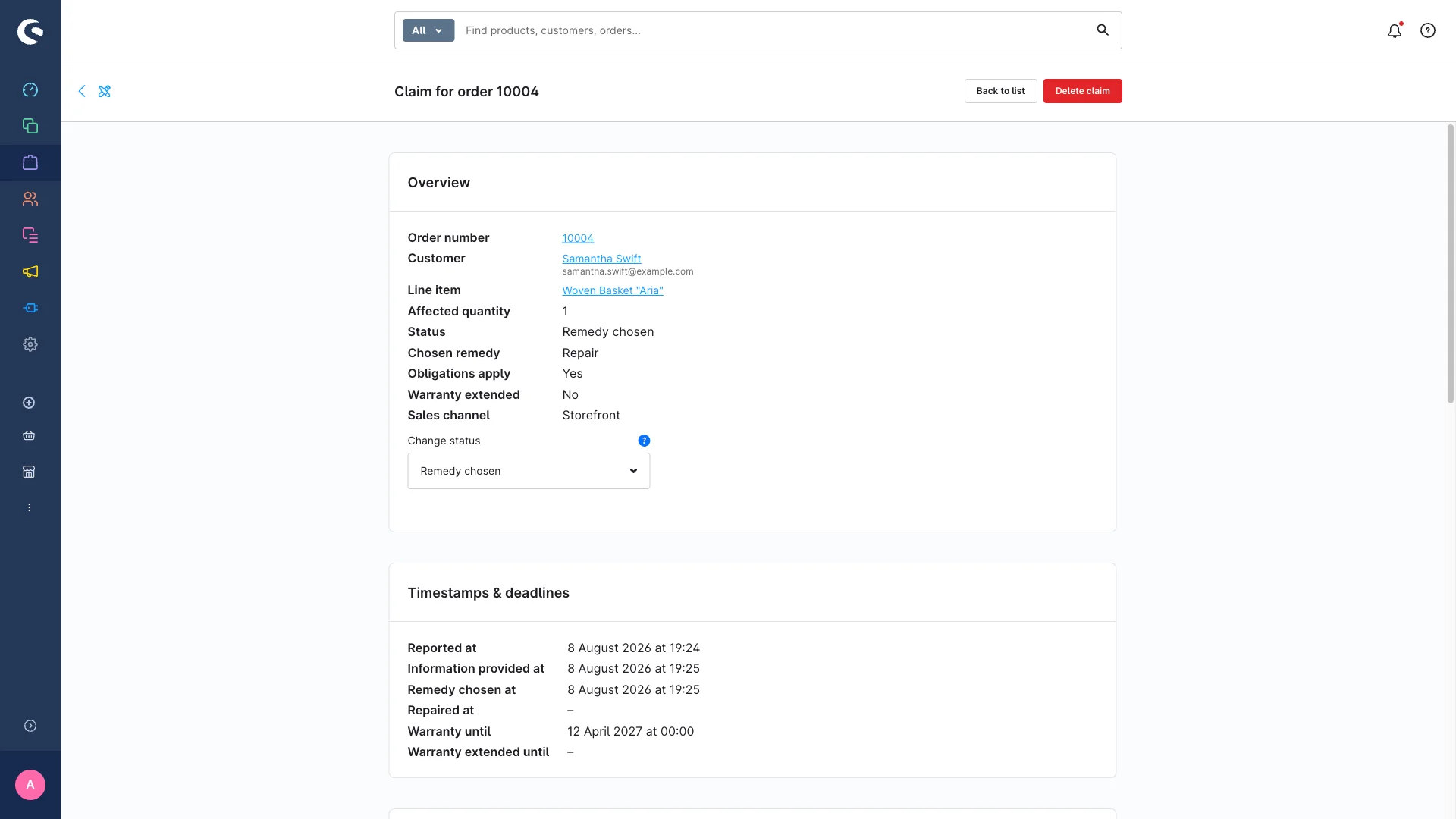
Concretely, here's what it takes off your hands:
- Automatic deadline calculation. When you hit "mark as repaired", the guarantee is extended once by twelve months – but only if repair was chosen, the claim is in scope, and it hasn't been extended before. The confirmation message tells you the new date right away.
- Cut-off logic based on the order date. Orders placed before the configured cut-off are automatically flagged as "voluntary", banner on the detail page included. Your two parallel worlds get sorted by the system, not by your team.
- Base period per sales channel plus country deviations. 24 months by default, deviating periods per country in a separate table – the country value takes precedence. The extension period itself is configurable too (0 switches it off).
- Timestamps as evidence. "Notice given on", "remedy chosen on", "repaired on", "guarantee extended until" – every date sits on the record, not in a note.
- A complete audit trail. Every status change is written to the activity log, with the old and new status plus extra data such as the chosen remedy and whether the extension was applied.
And because deadlines are only half the job: customers can report a defect straight from their account and pick the remedy themselves, there's a kanban board for the overview, a reminder for claims that have gone quiet, CSV import and export, and Flow Builder integration. The second set of obligations from the same area – the pre-contractual product page information under the EmpCo Directive – is in the plugin as well; we covered what that means in EmpCo Directive: new product page requirements.
What the plugin explicitly does not do: the legal assessment. The "obligations apply" field is a pre-fill based on the order date, not a legal judgement. Whether a claim is actually justified is your call – as is signing off on the supplied template texts and switching the cut-off dates live for your target markets.
The plugin is coming soon and will be in the Shopware Store shortly. If you don't want to wait, get in touch via our contact form and we'll give you early access and look at your store together. How we approach Shopware plugins in general – from the idea through store approval to maintenance – is on our services page.
Sources
Every legal statement in this article can be checked against the original (as of August 2026):
- Directive (EU) 2024/1799, Art. 16 (extension of the liability period)
- Directive (EU) 2019/771 (sale of goods), Art. 10
- Section 438 German Civil Code (BGB), English translation
Conclusion
The twelve-month extension isn't a big rule, but it's one that quietly works its way into your data. Three things to take away:
- Calculate it right: base deadline from delivery, then twelve months on top – not from the repair date.
- Draw the lines cleanly: once, per line item, repair only, and only for orders from the cut-off date onwards.
- Be able to prove it: notice about the choice, chosen remedy and repair date as timestamps – not as a memory.
Put those three in your system rather than in your head and the topic is handled before it becomes a topic. Push it into a spreadsheet and you'll notice the mistake in 2029 – in a conversation you can't win.
Not sure how your claims are documented today – or how many deadlines are quietly running in your store right now? Let's take a look together in a free initial consultation. We'll walk through your process, tell you honestly where the gaps are, and show you the plugin live. No obligation, no sales pressure – and afterwards you'll know where you stand.