From Finder to your server.
Drag files and folders into the app to upload them, or download them to your Mac. Manage progress and cancellation in a separate transfers window.
WebDAV Browser · now for macOS
Your files live on a NAS or your own server? Open, search and transfer them right on your Mac – with Finder drag and drop, file previews and local search.
macOS 15 or later · One server connection free
A dedicated file browser for your WebDAV storage. With a sidebar, list and grid views, previews and a clear view of your transfers.
Drag files and folders into the app to upload them, or download them to your Mac. Manage progress and cancellation in a separate transfers window.
A local index searches your connected servers. Optional text recognition makes images and PDFs searchable. Analysis runs on your Mac; the initial index takes time.
Open documents with Quick Look or stream audio and video from your server. Keep the files you need available offline.
Local folder → WebDAV
Link a folder on your Mac to a WebDAV folder. While the app is running, it checks regularly and uploads new or changed local files.
Sync runs from your Mac to the server, not in both directions. Remote changes are flagged as conflicts for review; local deletions do not automatically delete server files. Updating existing files requires server support for ETags.
Getting started
Your server address and credentials are all you need to get started. No Viovenia account required.
Enable WebDAV with your provider or NAS. You need the HTTPS address, your username and password – or an app password, depending on the provider.
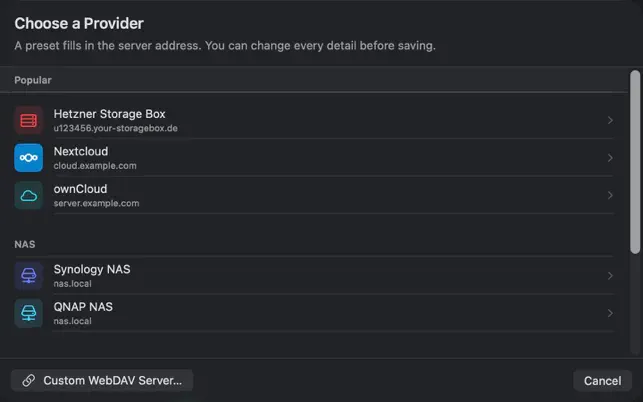
Use a preset for services such as Nextcloud or Hetzner Storage Box. For other services, choose a custom WebDAV server and enter the full address.
Check your credentials with the connection test. Then open folders, transfer files and set up local search.
Connect Nextcloud, ownCloud, Hetzner Storage Box, Synology or QNAP – and other services with a reachable WebDAV endpoint. WebDAV must be enabled on the server and available to your account.
All named brands belong to their respective owners. Names describe compatibility, not a business relationship.
File transfers go between your Mac and your server. Viovenia runs no intermediary servers for this and includes no tracking SDK.
Your passwords are stored in Apple Keychain.
OCR and content analysis run locally. You control the required downloads in settings.
If you only need to open a WebDAV server as a network drive, Finder may be enough. WebDAV Browser adds a local search index with optional text recognition, streaming, selected offline files and one-way folder sync. It is a separate app; it does not mount your storage as a Finder drive.
WebDAV Browser for Mac requires macOS 15 or later. Dragging multiple selected server files into Finder together is supported on macOS 26 and later. On older systems, drag individual items or use the download dialog.
Yes, if your server provides a reachable WebDAV endpoint and your account has the required permissions. Enable and configure the WebDAV service on Synology or QNAP. For Nextcloud, use the WebDAV address for your files and usually an app password when two-factor authentication is enabled. The app does not provide storage space.
Transfers continue when you close the browser window or switch to another app. WebDAV Browser itself must remain running. Uploads are not promised to complete after you quit the app. Folder sync also works only while the app is running.
No. Your first server connection is free and includes all features. Premium is required for additional connections. Without active Premium, your first connection remains usable; additional connections are locked. Your server or cloud storage is a separate service from your provider.
Yes. The iOS app is also available in the App Store. The Mac app offers desktop features such as Finder drag and drop and Quick Look. Camera backup, the document scanner and Live Activities are features of the mobile app.
One server connection is free, with every feature included. Premium unlocks additional connections. Find the current subscription price in the App Store.
Download on the Mac App StoremacOS 15 or later · One server connection free
WebDAV Browser is also available for iPhone and iPad.