The average Shopware shop quickly ends up with several hundred or thousand product images – and for the vast majority of them, the alt text is missing. That's not a cosmetic flaw: the alt text is exactly what Google "reads" about an image, and it helps decide whether your shop shows up in image search at all. At the same time, it's been a legal requirement for many shops since 2025. The good news: you don't have to type these texts by hand. In Shopware 6, alt texts can be generated automatically with AI – with product context, in multiple languages, and for fractions of a cent per image.
In this article we'll explain, as developers, why alt texts really matter, what the common cloud services cost (and where their pricing model falls apart) – and how to solve this properly and cheaply in your own shop.
The short version
- The short answer: In Shopware 6, AI generates alt texts automatically — with product context, in six languages.
- What it costs: Fractions of a cent per image, billed directly through your own OpenAI key.
- Why bother: Alt texts drive image SEO and are a legal requirement for many shops since 2025.
- Plugin vs. subscription: A one-time plugin beats a subscription that grows with your catalog.
What is an alt text – and why does it matter so much?
The alt text (alternative text, the HTML alt attribute) is a short text description of an image. It isn't visible in the shop, but it gets evaluated in three crucial places: by search engines, by screen readers, and any time an image fails to load. Put simply: it's the text form of your image – and text is what machines understand.
For a Shopware shop, a good alt text brings three concrete benefits.
1. Image SEO: Google only "sees" what you describe
Google has gotten remarkably good at analyzing images – but the alt text remains the most important signal for classifying an image, because it's the most reliable one. It works on two levels:
- Google Image Search: in retail especially, plenty of people start their search with images. A properly described product image can rank for "blue winter jacket men" and bring visitors straight to your product page – traffic you're otherwise giving away.
- Overall page ranking: alt texts give Google additional thematic context about the whole product page. They're no silver bullet, but they're one building block in the bigger picture of technical Shopware SEO.
If the alt text is missing, Google simply sees nothing there. An empty alt attribute is wasted ranking potential – sometimes a hundred times over, sometimes a thousand times over per shop.
2. Accessibility: a legal requirement for many shops since 2025
Screen readers – the software that reads pages aloud for blind and visually impaired people – can't "see" an image. They read out the alt text. Without it, the user only hears "image" or a cryptic file name. For a shop that means: products become incomprehensible, and the purchase falls through.
Since June 28, 2025, the Accessibility Strengthening Act (BFSG) – Germany's implementation of the European Accessibility Act – has been in force. It obliges many B2C online shops to make their offering accessible, and meaningful alt texts for informative images are part of the standard repertoire of accessible websites. Do nothing here and you're not just risking legal warnings – you're shutting out a real part of your customer base.
By the way, the BFSG isn't the only new obligation around images in your shop. If you use AI-generated product images, you've also had to label them as such since August 2, 2026 – we've written up what the AI content labelling obligation actually requires.
3. Conversion: more reach, better UX
Both points ultimately pay into the same account: more revenue. Image search brings additional, purchase-ready traffic. Accessibility grows the audience you can reach – roughly one in ten people in Germany lives with a recognized disability. And if an image does fail to load, the alt text makes sure the customer still understands what they're looking at.
- the date the BFSG started applying to many online shops
- June 28, 2025
- of your product images should have an alt text for SEO and accessibility
- 100%
- not hours – that's how long AI generation takes per image
- Seconds
Why you don't want to do this by hand
In theory you could write every alt text yourself. In practice, the sheer volume kills it. Do the math: say an image costs you a minute on average – look at it, describe it accurately, type it into the right field, save. At 2,000 images that's over 33 hours of dull, error-prone assembly-line work. And the next time your product range changes, you start over.
That's exactly why the instinct to outsource it makes sense. The only question is: to whom – and at what price?
What cloud alt text services cost – and where the catch is
There are various online services for automatic alt texts. We're not here to talk any provider down – the technology behind them is often solid. What we're critical of is the pricing model, which works similarly across many of these services. Let's look at the typical patterns soberly:
- Monthly subscriptions with a credit system. Plans of roughly $/€5 to 49 per month are common. Billing runs on credits: 1 credit = 1 image, sometimes 2 credits for special formats.
- Bulk packages for large catalogs. If you have a lot of images, you buy packages – for example around a low three-digit amount for 5,000 imagesfor 5,000 images, so about 3.5 cents per image.
- Free allowances as bait. A free starter package of 25 to 50 images invites you to try it out. After that, the subscription kicks in.
At first glance that sounds fair. The catch lies in the system behind it:
- The costs scale with your catalog size. The more products, the more expensive – and the bigger shops, the ones with the most images, pay the most.
- An ongoing subscription instead of a one-time purchase. You're not paying for a tool, you're paying for every single text – month after month, batch after batch.
- Little cost control. What your next product upload costs depends on credit consumption. Often you only see the bill afterwards.
- Lock-in. Want to revise texts, rephrase them, or regenerate them after a language change? You pay again. Your texts are tied to someone else's service.
- No product context. The external service doesn't know your product range. It sees an image – not that it's "model XY in merino wool, size M". The result: correct, but generic descriptions.
This pattern – an ongoing subscription that grows along with your success – is one we know from many corners of the Shopware ecosystem. Why a one-time plugin purchase often adds up far better than a permanent subscription, we've worked through in detail in Shopware plugin instead of a subscription.
The better way: generate alt texts yourself in Shopware 6 with AI
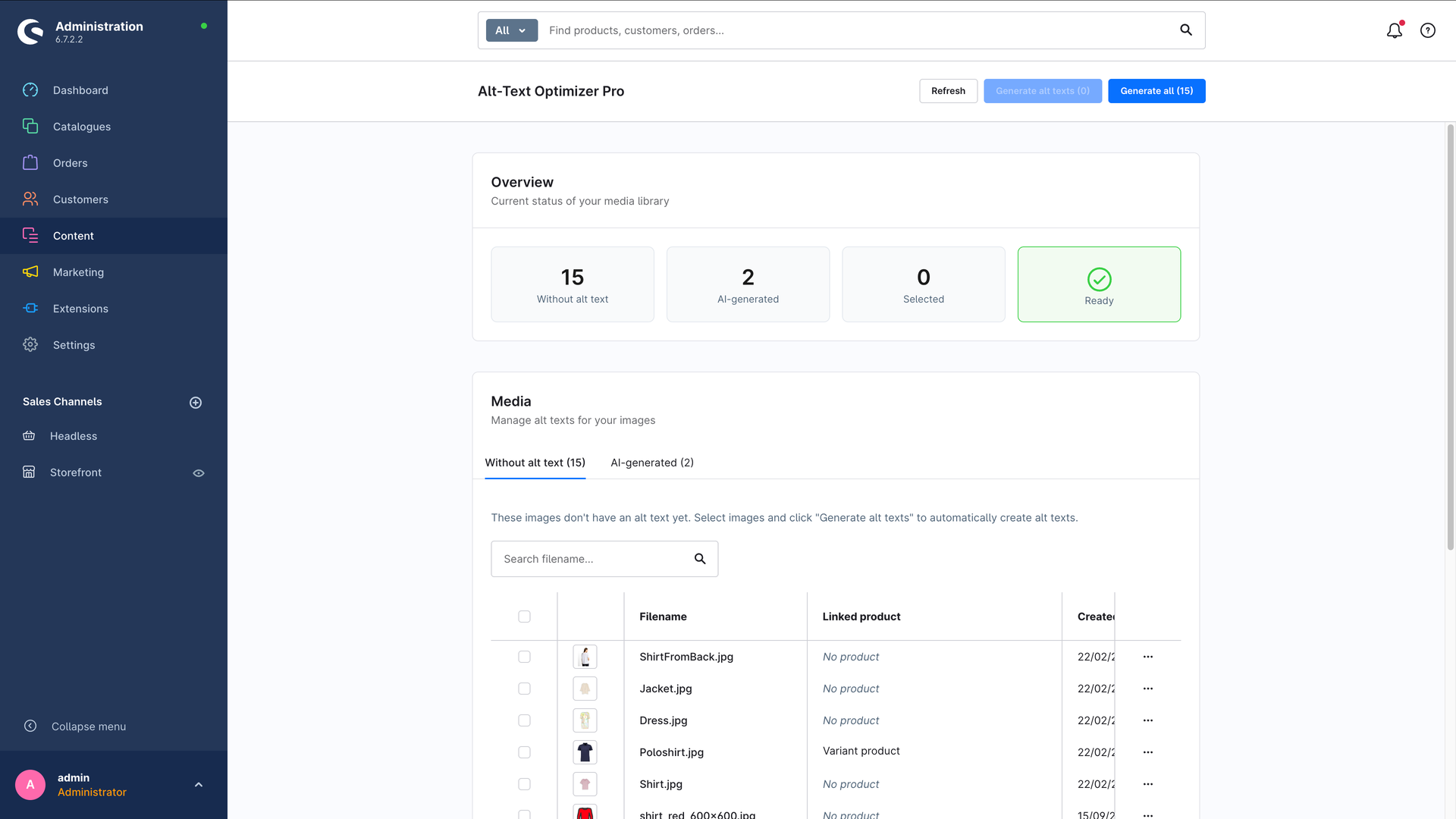
Our starting point was simple: the actual work – "looking at" an image and describing it – is done today by an AI model for fractions of a cent. So why pay for a subscription that resells exactly that cheap AI with an expensive markup? That's precisely why we built Alt-Text Optimizer Pro: a Shopware 6 plugin that generates the alt texts directly in your administration – with no middleman.
The principle in one sentence: you buy the plugin once, add your own OpenAI key, and after that you only pay the raw AI costs – directly to OpenAI, with no markup.
What the plugin actually gives you:
- A one-time license instead of a subscription. No monthly fee, no credits, no counting every single image.
- Your AI costs, transparently. With the GPT-4o mini model at low resolution you're looking at fractions of a cent per image – billed directly through your own OpenAI account. You keep full cost control and can even cap the tokens per request.
- Product context included. If you want, the product name and description feed into the generation. That's how you get "men's winter jacket in navy blue with a hood" instead of "blue jacket".
- Multilingual. Alt texts in German, English, French, Spanish, Italian and Dutch – the language is detected from the shop context.
- Controllable length. You set a minimum and maximum length (80–125 characters recommended). Texts that are too short get discarded, texts that are too long get trimmed cleanly.
- Configurable per sales channel. Different languages, models or budgets per sales channel? No problem.
Batch processing: hundreds of images at the push of a button
Batch processing is the heart of it. In a dedicated area of the administration (under "Content") one tab shows you all images without an alt text – your to-do list. You select individual images with checkboxes or process all of them at once. A progress page then shows the status per image, and at the end you get a summary.
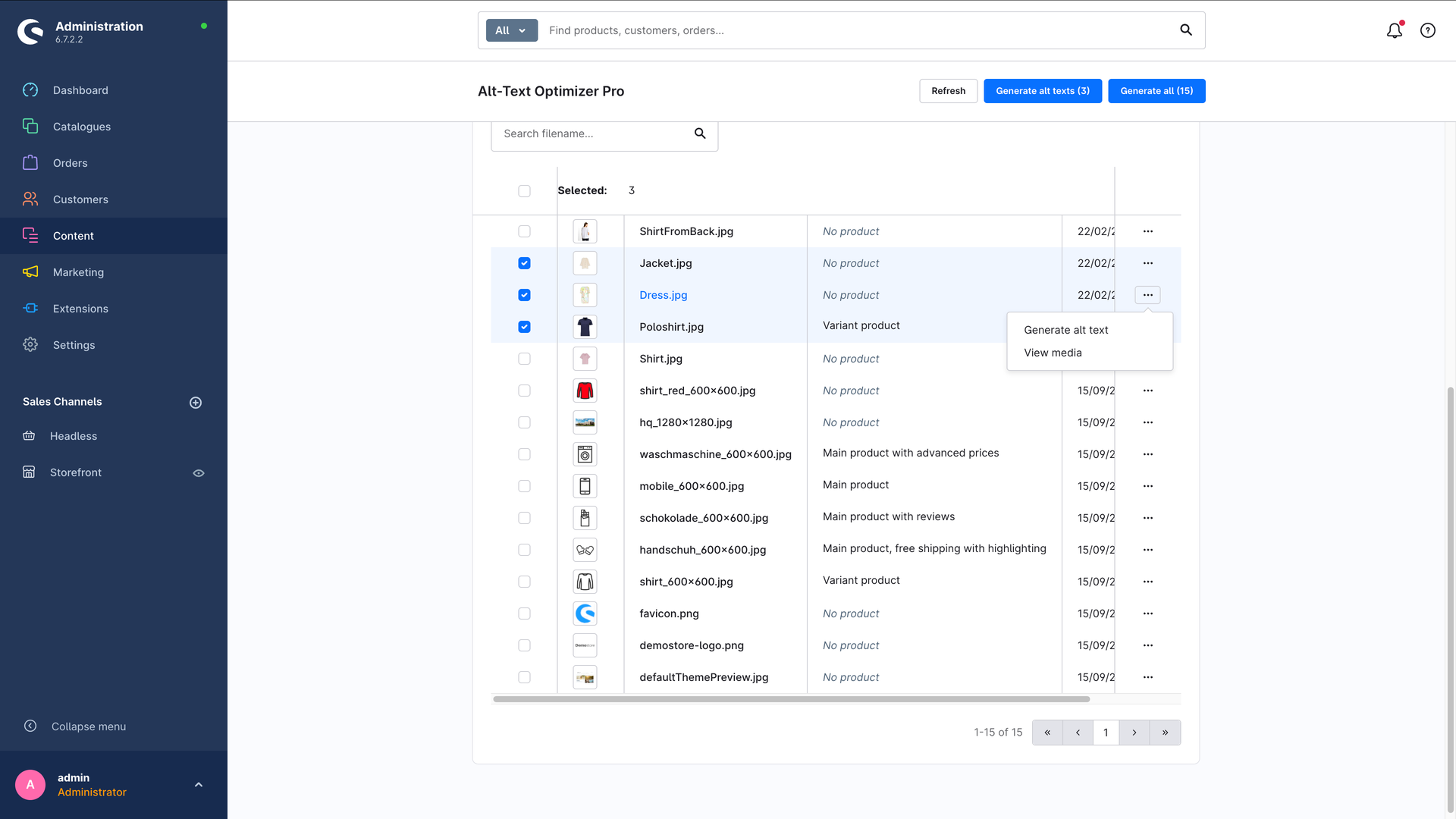
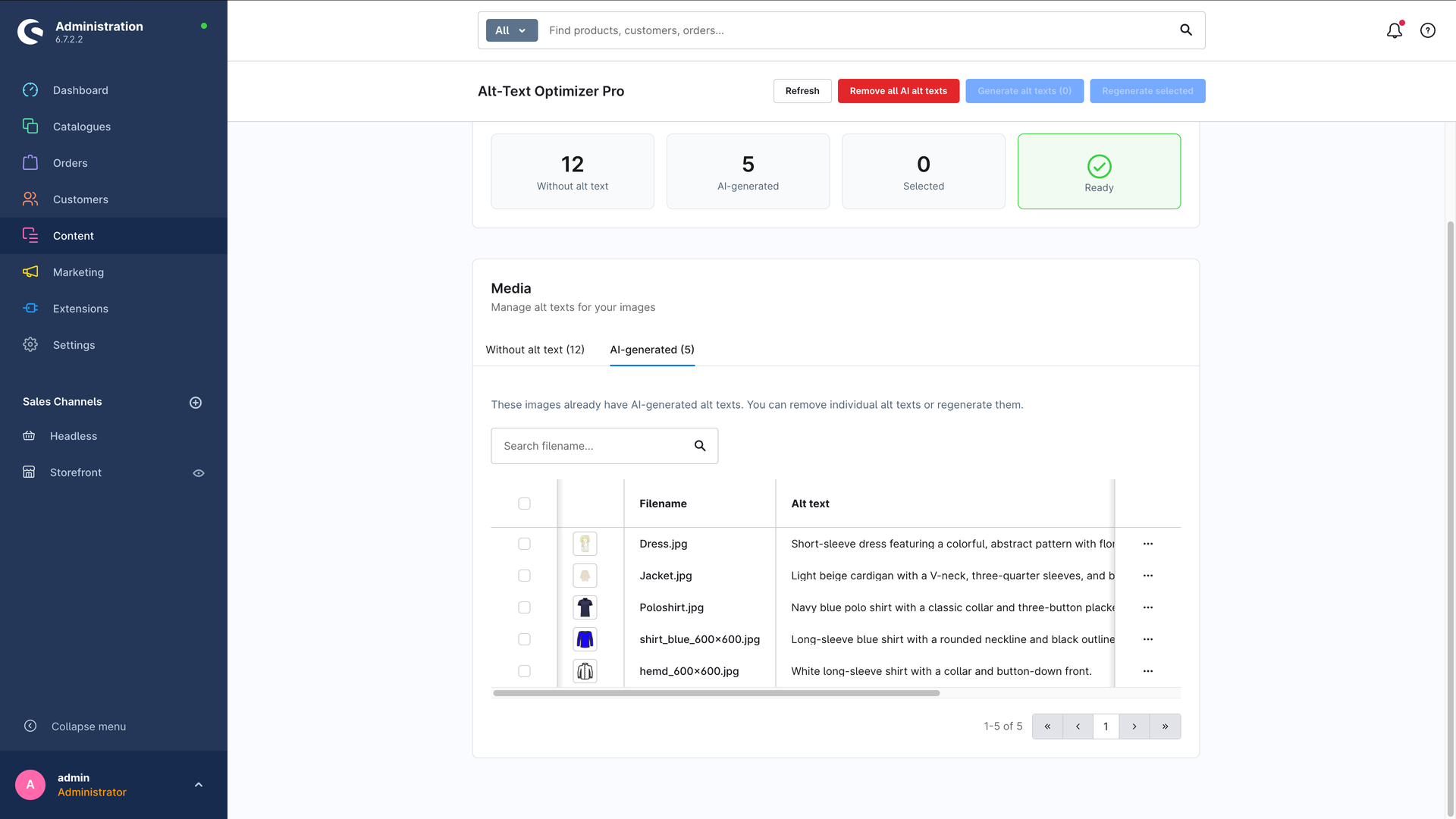
One important note: you stay in charge of the texts at all times. Every generated alt text lands in the media item's completely normal alt text field and gets flagged as "AI-generated". You can review it, adjust it, regenerate it or remove it again. How that works step by step is covered in the plugin documentation.
Top tip
Start with a small test run: generate 10–20 alt texts with GPT-4o mini at low resolution, switch on product context and check the results. If the tone fits, process the rest in batch. That way you calibrate length and style before the AI runs across your whole catalog – and the cost stays in the cents range while you do it.
Head to head: plugin vs. cloud service
Let's run the numbers on a realistic example – a shop with 5,000 product images:
| Criterion | Alt-Text Optimizer Pro | Typical cloud services |
|---|---|---|
| Pricing model | One-time plugin license | Monthly subscription + credits per image |
| Cost for 5,000 images | License once + a few euros of OpenAI | approx. a low three-digit amount for 5,000 images(bulk package) |
| For the next batch of 5,000 | again just a few euros of OpenAI | another approx. a low three-digit amount for 5,000 images |
| Cost control | full – your own OpenAI account, token limit | limited – credit consumption |
| Product context | yes, name and description feed in | usually not |
| Multilingual | 6 languages (DE, EN, FR, ES, IT, NL) | depends on the provider, often costs extra |
| Where the costs land | directly at OpenAI, no markup | at the provider, with a markup |
| Lock-in | none – the texts live in Shopware | regenerating costs again |
The difference isn't a gut feeling, it's arithmetic: with a cloud service you pay again for every new batch of images – with a purchased plugin you only pay the raw AI costs in cents. The bigger your catalog and the more often it changes, the more clearly the math tips in the plugin's favor. How the price of a Shopware plugin comes together in general, we break down in What does a Shopware plugin cost?.
Having an AI analyze an image costs less than a tenth of a cent today. A model that sends you a monthly subscription invoice for exactly that is mainly selling you one thing: a margin. We wanted to build a tool you own – not one you rent.
The alternatives, stated plainly
So the table does not read like a monologue — these are the realistic routes, and our plugin is only one of them:
- Write them by hand. For up to a few hundred images this is the best option: nobody knows your products better. Past roughly 500 images the math flips, because the effort per image stays constant while the count does not.
- Shopware's own AI features. The commercial plans include AI assistance for text. If you are on one of those plans anyway, check that first before buying an additional plugin.
- Other store plugins. There are competitors in the Shopware Store, mostly on subscription or credit models. The difference is less about text quality than about the cost model and whether product data feeds into the prompt.
- Your own script against the Shopware API. Technically straightforward and the cheapest option for developers. What is missing is the interface for your editors — and with it the repeatability when you are not the one at the keyboard.
Choose based on how often you need this: once for a back catalogue, or continuously for every new product. For the one-off case, manual work or a script is enough; for continuous use, automation pays.
Bottom line: a tool you own
Alt texts aren't a nice-to-have. They help decide whether your shop gets found in image search, whether it satisfies accessibility law, and whether all your customers can actually shop with you. With hundreds or thousands of images, doing it by hand isn't an option – automating is the only realistic path.
The only question is how: as an ongoing subscription that grows with your catalog, or as a tool you buy once, where you only carry the raw AI costs in cents. We're convinced by the second path – which is exactly how we built Alt-Text Optimizer Pro: buy once, use your own OpenAI key, full product context, hundreds of images at the push of a button.
Want to know whether the plugin pays off for your shop, or need a hand with image SEO and accessibility in Shopware? Take a look at the plugin directly in the Shopware Store – or let's take a look together in a free initial consultation. We'll tell you honestly where the biggest levers are with your product images. No obligation, no sales pressure.
Frequently asked questions
How do you generate alt texts automatically in Shopware 6?
With a plugin that does the generation directly in your administration. In our Alt-Text Optimizer Pro you buy the license once, add your own OpenAI key, and then see a tab listing every image without an alt text. Select images with checkboxes or process the whole catalog in batch, and each text lands in the media item’s normal alt text field.
What does automatic alt text generation cost?
With the GPT-4o mini model at low resolution you’re looking at fractions of a cent per image, billed directly through your own OpenAI account with no markup. Typical cloud services instead sell monthly subscriptions with credits or bulk packages – for example a low three-digit amount for 5,000 imagesfor 5,000 images, so a few cents per image, and again for the next batch.
Are alt texts legally required in an online shop?
For many B2C online shops in Germany, yes. Since June 28, 2025 the Accessibility Strengthening Act (BFSG) has been in force, and meaningful alt texts for informative images are part of the standard repertoire of accessible websites. Beyond the legal side, missing alt texts shut out everyone browsing with a screen reader.
Can I still edit AI-generated alt texts?
Yes, you stay in charge at all times. Every generated text is stored in the completely normal alt text field of the media item and flagged as AI-generated, so you can review it, adjust the wording, regenerate it or remove it again. You also set the minimum and maximum length yourself – 80 to 125 characters works well.