Right to Repair & EmpCo: Claims and Repairability - Notifications & log
Status emails, the reminder about claims left sitting, Flow Builder triggers and the activity log.
The extension keeps you and your customers in the loop – with automatic emails, a reminder about claims that have been sitting untouched, and a log that records every change. This page explains what happens when, and how you control it.
Status emails to your customers
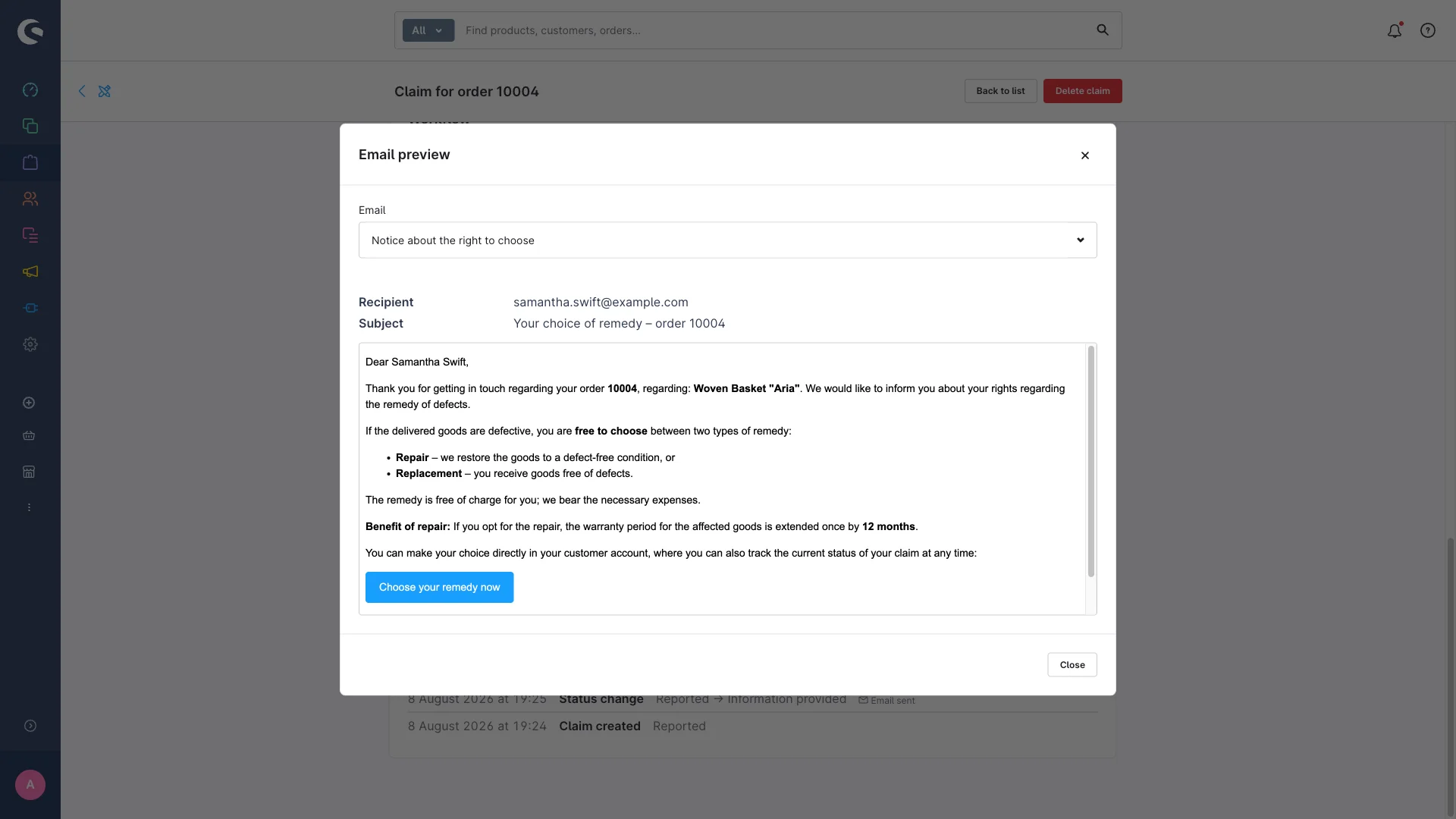
When you move a claim through the workflow, the extension can send the matching email to the customer automatically. All texts ship as editable samples.
| Workflow step | Email to the customer |
|---|---|
| Give the notice (status "Notice given") | "Remedy: notice about your right to choose" |
| Confirm the choice (status "Remedy chosen") | "Remedy: confirmation of the chosen remedy" |
| Send instructions (from "Remedy chosen", repeatable) | "Remedy: handling instructions" – return address, process, timing |
| Close (status "Closed") | "Remedy: closing confirmation" – names the extended warranty if there is one |
All of them go to the customer on the order.
The master switch
Whether these emails go out at all is controlled by Send notification emails in the configuration (Modules card). It's on by default. Switch it off if you talk to your customers outside the shop – the compliance timestamps are still recorded.
How the switch plays out depends on where you work:
- Claim detail page: the workflow button triggers its email – if the switch is on.
- Kanban board: dragging a card sends an email only if you actively ask for it and the switch is on.
Editing the texts
You edit the content of the four emails in your shop's mail template management. Order data and claim data are available as placeholders, so things like the order number and the deadlines fill themselves in.
Fill in the "handling instructions" template before your first send. It ships deliberately as a fill-in-the-blanks template with placeholders in square brackets, e.g. "[enter return address here]", "[describe the return or pickup process here]" or "[enter the expected turnaround time here]". The extension can't guess your return address or your turnaround times. Open the template before your first send and replace every bracketed line with your own details – otherwise those lines go to your customer unchanged.
Existing installations: the installer only creates mail templates on first install and never overwrites an existing template, not even on update. So if you update an existing installation, new email wording doesn't arrive automatically – your own (possibly customised) templates stay as they are. Only a fresh installation gets the current texts automatically; on an existing one you add them manually in the mail template management if you want them.
Send replies to the right inbox
Enter a Reply-to address for customer emails in the configuration (Modules card) and customer replies to all the claim emails go there instead of your shop's default address. The same address is used for the merchant reminder email described below. Leave it empty for the shop default.
On the guided Give the notice step the compliance timestamp "Notice given on" is always set – even if the email fails to send. You get an extra warning in that case so you can inform the customer another way. Your documentation stays complete.
Reminder for open claims
So nothing quietly falls through the cracks, the extension checks once a day which claims are still sitting in Reported with no notice given. If one has been there longer than the number of days you configured, you get flagged.
| Setting | Default | What it does |
|---|---|---|
| Reminder for open claims (days) | 14 | After this many days without a notice given, a reported claim counts as overdue. 0 switches it off. |
| Email address for reminders | empty | Gets an email about overdue claims on top of the admin notification. Empty = no email. |
What happens on a hit? A notification appears in the administration (as a warning), visible to everyone with read access to the claims module. So your team sees immediately that something is open. The check is logged too.
If you stored an address under Email address for reminders, an email goes there as well, naming the number of overdue claims. Its content comes from the editable mail template "Remedy: deadline reminder for the merchant (Repair Compliance)". That email contains no customer data – only the count and your configured reminder period.
Flow Builder: build your own rules
Every workflow step is also available as a trigger in the Flow Builder, and there's a dedicated action to create claims automatically. That lets you build extra automation without writing any code – your own email, an internal tag, a webhook to another system, a link into another extension.
Available triggers
| Trigger | When it fires |
|---|---|
viove.repair_compliance.claim.created | A claim was created – in the admin, via the customer's self-report, or via the action below. |
viove.repair_compliance.claim.info_provided | The notice about the right to choose was given. |
viove.repair_compliance.claim.remedy_chosen | The remedy (repair or replacement) was chosen. |
viove.repair_compliance.claim.instructions_sent | The handling instructions were (re)sent. Can fire more than once per claim. |
viove.repair_compliance.claim.repaired | The remedy was completed, including any warranty extension that was applied. |
viove.repair_compliance.claim.status_reset | A claim was set back to Reported via a free status change. |
What data each trigger carries
All six triggers provide the same fields:
| Field | What it means |
|---|---|
claimId | ID of the claim |
orderId | ID of the related order |
orderLineItemId | ID of the affected line item |
status | The new status of the claim |
previousStatus | The status before (empty when the claim was just created) |
remedyChoice | The chosen remedy, if one was picked |
eligible | Whether the claim is eligible |
extensionApplied | Whether the 12-month extension has already been applied |
warrantyUntil | The end of the base warranty |
warrantyExtendedUntil | The new end of the warranty after an extension, if there is one |
On top of that the triggers are order-aware and mail-aware: in the Flow Builder you also get the related order as a record and the Send email action (to the order's customer) – again, no code needed.
Action: create claim
The other direction: the Flow Builder action Create claim logs claims automatically instead of you doing it by hand – for example in a flow that starts when an order reaches a certain return or order status.
When it runs, it checks every product line item of the order in the flow and creates a new case in status Reported for each line item without an existing claim (affected quantity 1 each – enter a different quantity afterwards in the admin). Line items that already have a claim are skipped, and an error on one line item doesn't stop the rest. At most 100 line items are processed per run.
The activity log
Every status change of a claim is logged automatically. So you can always retrace what happened when – which is exactly what you want for your compliance documentation.
What gets recorded
Every status change produces exactly one log entry with:
- the action that ran,
- the previous and the new status,
- relevant extra details – which remedy was chosen, whether an email was sent, whether the +12-month extension was applied, and the affected deadline dates.
The log runs in the background – you never type anything into it. And if a log entry can't be written for some reason, the status change itself still goes through normally.
Automatic cleanup after 6 months
The log doesn't grow forever: a scheduled task deletes log entries older than 6 months automatically. The claims themselves and their current data are not affected – only the older history is trimmed.
No legal advice: the email texts that ship with the extension are samples. Review them against your own situation before you use them.