Since August 2, 2026 you have to visibly label AI-generated images of realistic-looking people, places or events in your store. The obligation is clear; the practical question behind it isn't: with 4,000 media files, how do you know which came out of Midjourney, Firefly or ChatGPT – especially when half of them arrived from an agency, a freelancer or a stock platform?
Part of the answer sits in the files themselves. Many generators embed provenance data: signed Content Credentials under the C2PA standard, IPTC fields such as DigitalSourceType, or invisible watermarks like SynthID. On November 7, 2026 we went through the documentation of twelve providers, the C2PA specification, the IPTC vocabulary and the legal framework. Result: the big US providers deliver, Midjourney doesn't, and what reaches you depends on the platform the image travelled through.
The short version
- C2PA is embedded by OpenAI (ChatGPT, API), Adobe Firefly, Google Gemini ("Nano Banana"), Microsoft Designer and Bing, the Stability API and Black Forest Labs' Flux API. Midjourney sets no manifest; Ideogram, Leonardo, Recraft, Freepik can't be verified; open-weight models only deliver if the host does.
- IPTC
DigitalSourceTypeusually sits inside the C2PA manifest; a separate XMP field is documented only for Meta AI. SynthID is used by Google and, since 2026, OpenAI. - All of it is fragile: screenshots, format changes and most social media uploads strip the data. The Washington Post tested eight platforms in October 2025 – all eight removed the credentials.
- Missing signals prove nothing. That's why our plugin EU AI Act Compliance reads C2PA and IPTC data on upload as a suggestion with a confidence score – the decision stays with you.
As always: we're software engineers, not lawyers. The legal part is our practical summary of the regulation, the guidelines and the code of practice, not legal advice. Whether the labelling obligation applies to you at all we explained in August; this article is about the technology.
What to do depending on where the image came from
Images from ChatGPT, DALL·E, Firefly, Gemini, Designer or the Flux API
Read the manifest and adopt it
These files carry a signed C2PA manifest with the IPTC value for AI generation. As long as nobody pushed them through a screenshot or a social platform, a verification tool or the plugin reads the status straight out.
Images from Midjourney, local Stable Diffusion or Flux via third-party hosts
Classify manually, set a folder default
No manifest, no documented marking. Put such images into a dedicated media folder with the default status “AI-generated” and record the origin in the brief or the invoice.
Photos edited with Generative Fill or Generative Expand
Decide: retouching or substantial manipulation
Firefly writes the IPTC value “compositeWithTrainedAlgorithmicMedia” into the manifest for these. Whether the change is substantial depends on the content – a removed blemish is standard editing, an added model isn’t.
Images from an agency, freelancer or stock platform
Demand proof of origin
Platforms strip metadata on upload almost always. Require the original files with credentials in the brief, or a written statement of which tool was used – that goes into the AI register later.
Three layers of provenance marking
When people say "AI watermark" they usually mean one of three very different techniques. They differ in who can read them and what they survive.
| Layer | What it is | Who reads it | Survives screenshot / format change? |
|---|---|---|---|
| C2PA Content Credentials | Signed, timestamped manifest in the file (JUMBF block for JPEG and PNG) with issuer, tool, actions and the IPTC provenance value; specification currently version 2.5 (October 2026) | Any C2PA tool: Content Credentials Verify, c2patool, exiftool, plugins | No – gone with a screenshot, often gone with format changes and platform uploads |
IPTC DigitalSourceType | Standardised metadata field with values such as trainedAlgorithmicMedia; as an XMP field or inside the C2PA manifest | exiftool, image management tools, Google Search ("About this image") | No – like all metadata |
| Invisible watermark (SynthID, Meta Content Seal, Stability) | Anchored in the pixel pattern, survives compression and moderate cropping | Only the provider or its detector – SynthID Detector, Gemini app, meta.ai | Partly – screenshots yes, heavy cropping not always (Meta: 55 % of cropped images not recognised) |
| Visible watermark | Logo or "Imagined with AI" in the image | Any human | Yes, unless cropped away |
For a store the first layer is the most useful: it's open, machine-readable and contains, in the IPTC value, exactly the information you need for the AI status. The third layer you can only check through provider tools – four providers, four different detectors.
Twelve generators compared
The table sums up what the providers themselves documented on November 7, 2026. "Not verified" means: we found no provider statement – neither for nor against.
| Generator | C2PA manifestin the file | IPTC DigitalSourceTypeAI value set | Invisible watermark | Visible watermark | Publicly verifiabletool |
|---|---|---|---|---|---|
| OpenAI – ChatGPT Images, DALL·E 3, API | yessince 02/2024, conforming generator (spec 2.4); exception: API models being deprecated | partlyin the manifest | yesSynthID since 2026 | no | yesopenai.com/verify, Content Credentials Verify, SynthID Detector |
| Adobe Firefly, Photoshop Generative Fill | yesautomatic since 03/2023 | yescompositeWithTrainedAlgorithmicMedia for Generative Fill | not verified | not verified | yesContent Credentials Verify, Adobe Inspect |
| Midjourney | nono manifest, as of 02/2026 | not verified | not verified | no | nofile inspection only |
| Google Gemini – Nano Banana, Gemini 3 Pro Image | yessigner Google LLC, conformance 2.2 | partlyin the manifest | yesSynthID | not verified | yesGemini app, SynthID Detector, Content Credentials Verify |
| Google Imagen 3 and 4 (Vertex AI) | nomissing from Google’s model list | not verified | yesSynthID, can be disabled via API | not verified | yesSynthID Detector, Vertex “Verify” |
| Stability AI – Stable Image API | yesAPI output only, not open weights | not verified | partlysome endpoints | no | partlyC2PA yes, watermark without public detector |
| Black Forest Labs – Flux API | yesall API endpoints since 09/2024; not on the trust list | partly“declared AI-generated” in the manifest | partlyoptional soft binding | no | yesContent Credentials Verify, c2patool |
| Flux.1 dev/schnell, Stable Diffusion locally or on third-party hosts | noonly if the host signs | no | no | no | no– |
| Microsoft Designer, Bing Image Creator | yessince 09/2023, interim trust list | partlyin the manifest | not verified | yeslogo in Bing Image Creator | yesContent Credentials Verify |
| Meta AI – Imagine, Muse Image | not verified | yestrainedAlgorithmicMedia as XMP, per IPTC | yesown watermark, Content Seal since 07/2026 | yes“Imagined with AI” | partlymeta.ai/identification, preview |
| Canva Magic Media, Dream Lab | partlyper terms and Wikipedia since 11/2025, no product docs | not verified | not verified | not verified | partlyContent Credentials Verify, if a manifest exists |
| Ideogram, Leonardo.ai, Recraft, Freepik | not verified | not verified | not verified | not verified | nofile inspection only |
Legend:yespartlynonot verified
Sources: help and developer documentation of the providers, C2PA specification and conformance explorer, IPTC, Wikipedia overview of Content Credentials implementations, secondary sources on Midjourney (c2paviewer, fast.io, as of early 2026). “Not verified” = no provider statement found. Adobe help pages were readable only via search snippets.
Three observations from the table:
- The C2PA camp is large but not complete. OpenAI, Adobe, Google, Microsoft, Stability and Black Forest Labs cover most professionally used tools. Midjourney – widespread in e-commerce for mood imagery – is missing. If you commission an agency that works in Midjourney, you get files without any machine-readable provenance.
- API isn't model. Stability and Black Forest Labs sign what their own API outputs. The same models as open weights on a rented server or in ComfyUI deliver nothing. So don't ask service providers "which model" but "which service".
- Two signals instead of one. Since 2026 OpenAI and Google combine manifest and SynthID watermark – exactly what the code of practice demands. For you that means: if the manifest is missing, the watermark may still be there, you just can't read it without the provider.
What survives the trip to you
The uncomfortable truth about metadata: it gets lost before the image reaches your server. Three findings, all sourced:
- Platforms strip credentials. On October 22, 2025 the Washington Post uploaded a Sora video with Content Credentials to eight platforms. All eight removed the marking; only YouTube showed a notice, hidden in the description.
- Everyday actions are enough. OpenAI itself writes that credentials can be lost through screenshots, file conversion, resizing or upload and download. Black Forest Labs warns about social platforms and content management systems that strip or modify metadata.
- Watermarks last longer, but not forever. Meta's own detector recognised all 40 originals in the Reuters test of July 2026 but missed 55 percent of the cropped images.
For your store that leads to a rule the providers themselves state: missing signals are no proof that an image isn't AI-generated. A verification tool can tell you "yes, AI". It can't tell you "no, not AI".
Top tip
Demand from agencies and freelancers the original file straight out of the generator – not the export from Figma, not the download from the client portal, not the WhatsApp version. Only the original carries the manifest. And get it in writing in the quote which tool was used. Together those two are the entry in the AI register you may have to produce later.
The IPTC vocabulary – and how it maps to the four AI statuses
The IPTC Photo Metadata Standard (currently version 2025.1 from November 2025) defines a fixed vocabulary for DigitalSourceType. The C2PA specification adopts it: every c2pa.created action has to carry one of these values. Exactly these values map onto the four AI statuses our plugin works with.
| IPTC value | Meaning per IPTC | Example | AI status in the plugin |
|---|---|---|---|
trainedAlgorithmicMedia | Created using generative AI | Product image entirely from ChatGPT or Firefly | AI-generated |
compositeWithTrainedAlgorithmicMedia | Edited using generative AI | Photo extended with Generative Fill | AI-manipulated, if substantial |
compositeSynthetic | Composite with at least one AI element | Collage of photo and AI background | AI-manipulated, if substantial |
algorithmicallyEnhanced | Algorithmically enhanced without changing content | Noise reduction, upscaling | Standard editing only |
humanEdits | Manual edits | Hand retouching | Standard editing only |
digitalCapture | Digital capture from real life | Camera photo | Not AI |
algorithmicMedia | Purely algorithmic, no training data | Formula graphic, fractal | Not AI in the labelling sense |
The mapping is an aid, not a legal assessment. Whether an AI edit is "substantial" and therefore has to be labelled depends on the content of the change, not on the metadata value – how the line between retouching and manipulation is drawn in practice is in the fundamentals article. Since version 2025.1 IPTC also knows the fields "AI System Used" and "AI System Version Used" – if a tool writes them, the generator is documented along with the image.
How to check a file yourself
For spot checks you don't need a plugin, just three tools:
In the browser: Content Credentials Verify takes a file and shows issuer, tool, actions and whether the signer is on the C2PA trust list. For OpenAI images, openai.com/verify additionally checks the SynthID watermark; for Google images, the SynthID Detector or the Gemini app.
On the command line with exiftool and c2patool:
exiftool -XMP-iptcExt:DigitalSourceType image.jpg
exiftool -a -G1 -s -XMP-iptcExt:all -JUMBF:all image.jpg
c2patool image.jpg
The first command shows the separate XMP field, if present. The second lists IPTC extensions and the raw data of the C2PA manifest – for Firefly files you'll see ActionsDigitalSourceType with the value compositeWithTrainedAlgorithmicMedia and ActionsSoftwareAgent: Adobe Firefly. c2patool prints the full manifest as JSON, including signature verification. If the signer isn't on the trust list – as with Black Forest Labs – the tool reports that without the data being wrong.
What Art. 50 requires – and from whom
Two duties, two addressees, often confused:
- Art. 50(2) hits the providers of AI systems: their output has to be "marked in a machine-readable format and detectable as artificially generated or manipulated", effective, interoperable, robust and reliable. That's the duty OpenAI, Google and Adobe meet with manifests and watermarks.
- Art. 50(4) hits you as a deployer: anyone who uses an AI system to generate or manipulate image, audio or video content that is a deepfake – realistic-looking people, places or events – has to disclose that the content was artificially generated or manipulated. Visibly, for humans. The Commission's guidelines state explicitly that purely machine-readable marks aren't enough for that.
Both paragraphs apply since August 2, 2026. The Digital Omnibus (Regulation (EU) 2026/1744, in force since July 27, 2026) postponed only one thing: providers whose systems were on the market before August 2 have until December 2, 2026 for machine-readable marking (new Art. 111(4)). Your deployer duty is unaffected.
Two documents in summer 2026 made the technology concrete:
- The Code of Practice on Transparency of AI-generated Content, final version of June 10, 2026, confirmed as adequate by the Commission on July 8 and by the AI Board on July 9, with around 190 signatories by the end of July. Core demand on providers: at least two marking layers – signed, tamper-evident metadata plus an invisible watermark that survives compression and cropping. Plus a free detection solution and, by February 2, 2027, an interoperability solution for watermark detection. For deployers the code has a section on labelling deepfakes; the EU published freely usable labelling icons for it.
- The Commission's guidelines on Art. 50 of July 20, 2026: not binding, but authoritative for interpretation. They name exceptions for short outputs such as alt text and captions, for standard editing and for closed environments – and clarify that downstream providers may rely on the model provider's marking if they can show it works.
The fine range for violations of Art. 50 is in Art. 99(4)(g): up to €15 million or 3 percent of global annual turnover, for SMEs whichever is lower.
What your store can read from it
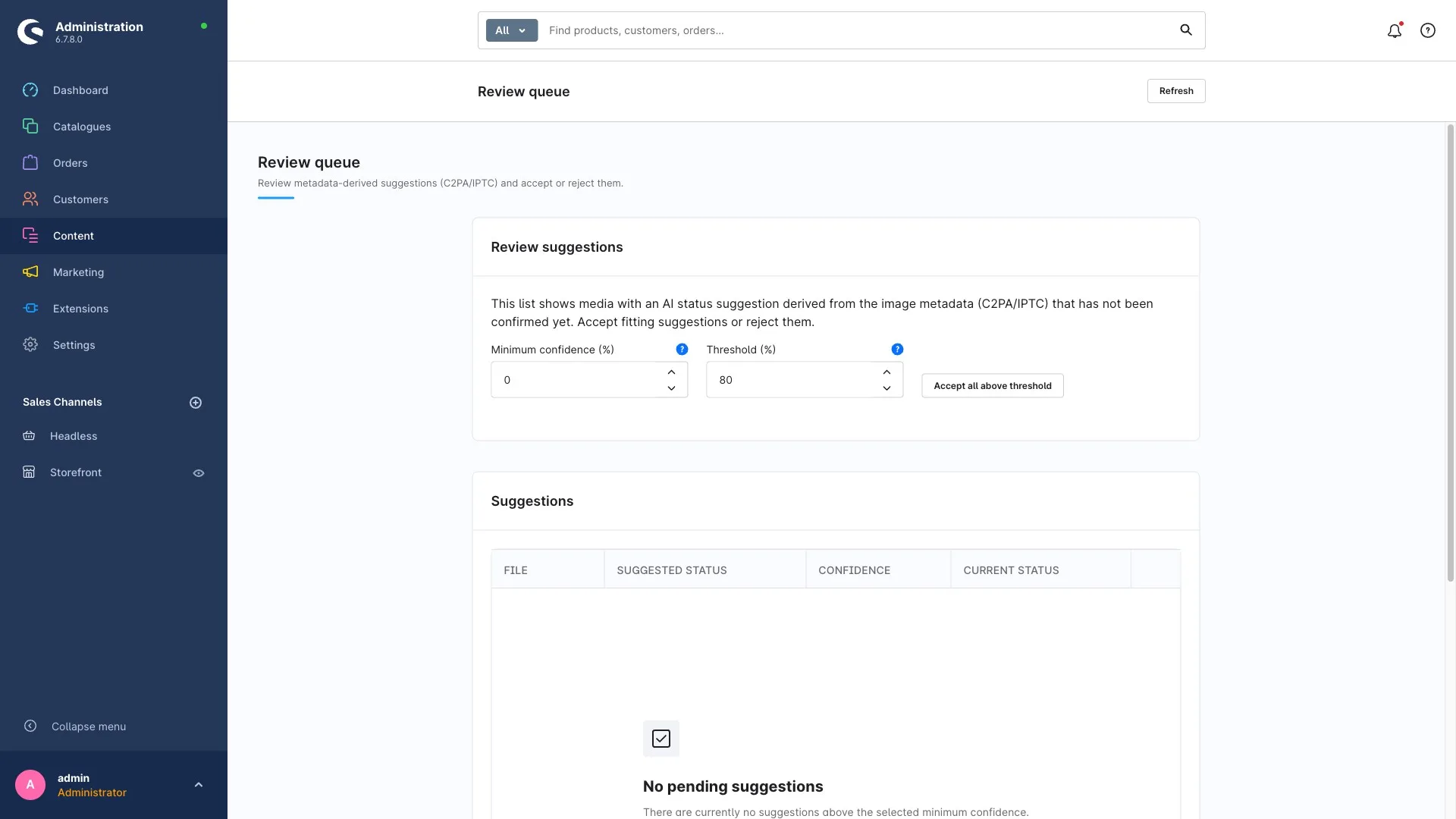
Our plugin EU AI Act Compliance reads exactly the first layer on upload: the C2PA manifest and IPTC fields. If it finds an AI value, it creates a suggestion for the AI status with a confidence between 0 and 1. The suggestion lands in the review queue, where you accept or reject it; above a minimum confidence you set, the plugin can adopt it automatically if you want. The files themselves stay untouched – it only reads, never writes.
What it deliberately doesn't do: guess. There is no heuristic deriving "looks AI-generated" from pixel patterns, and no connection to SynthID or Meta detectors. A misclassification would be your liability risk, not ours. For images without signals – Midjourney, local models, agency exports – there are folder defaults, bulk marking and CSV import; how to label thousands of images in one afternoon with those is in the hands-on article. Every adoption, automatic or manual, goes into the change log and the AI register – the evidence you need when someone asks where an image came from.
Checklist: provenance under control
- Inventory of sources: which generators does your team use, which do your agencies? Check each one in the table above for signing.
- Keep originals: always store AI images as the original file from the generator, not as an export from an intermediate tool.
- Adjust delivery terms: require original files with credentials and a written statement of the tool from service providers.
- Enable the metadata scan and set the minimum confidence for automatic adoption deliberately – or confirm everything manually in the review queue.
- Folder defaults for sources without signals (Midjourney, local models).
- Spot checks with Content Credentials Verify or c2patool – ten images once a quarter.
- Export the register whenever the source situation changes.
Frequently asked questions
Which AI image generators embed C2PA Content Credentials?
Per provider documentation as of November 2026: OpenAI (ChatGPT Images, DALL·E 3, API), Adobe Firefly including Photoshop Generative Fill, Google Gemini with the Nano Banana models, Microsoft Designer and Bing Image Creator, the Stability API and Black Forest Labs’ Flux API. Midjourney sets no manifest; for Ideogram, Leonardo.ai, Recraft and Freepik there is no provider statement. Google Imagen on Vertex AI uses SynthID but isn’t on Google’s list of C2PA models.
Does Midjourney set metadata about AI origin?
Not a C2PA manifest, according to consistent sources as of early 2026. Midjourney writes details such as username and job ID into EXIF and IPTC fields; whether the IPTC value DigitalSourceType is set is described inconsistently, and there is no provider documentation. Midjourney images should therefore be labelled as AI-generated manually, for example via a media folder with a default status.
Can a store plugin detect AI images automatically?
It can read existing provenance data – C2PA manifests and IPTC fields – and suggest a status from them. It can’t prove that an image without such data isn’t an AI image, because screenshots, format changes and platform uploads strip the data. Our plugin EU AI Act Compliance therefore works with suggestions and confidence, not heuristics; the decision stays traceably with you.
What is the difference between C2PA and SynthID?
C2PA is an open standard for signed metadata in the file: anyone can read it with free tools, but it’s lost on screenshots or platform uploads. SynthID is Google’s invisible watermark in the pixel pattern: it survives compression and screenshots but can only be checked with Google’s detector or the Gemini app. OpenAI uses both since 2026, as the code of practice with its two marking layers demands.
Do I have to label AI images even though the provider already marked them?
Yes. Machine-readable marking is the provider duty under Art. 50(2) AI Act. Your deployer duty under Art. 50(4) requires a visible disclosure for humans when the image shows realistic-looking people, places or events. The Commission’s guidelines make clear that purely machine-readable marks aren’t enough for that.
What applies from December 2, 2026?
On that day the transition period under Art. 111(4) AI Act, introduced by the Digital Omnibus, ends: providers of generative AI systems that were on the market before August 2, 2026 must mark their output machine-readably by then at the latest. Nothing changes for store operators – the transparency duties under Art. 50(1) and (4) apply since August 2, 2026.
Sources
Retrieved November 7, 2026:
- OpenAI: Provenance signals in OpenAI-generated content and Advancing content provenance
- Google: Content Credentials in Vertex AI, Imagen: generate images, SynthID
- Black Forest Labs: C2PA in FLUX-generated images
- Stability AI: Integrity Transparency Report
- Microsoft: Designer FAQ and Bing Image Creator help
- Meta: Labeling AI-generated images; IPTC: Digital Source Type and Photo Metadata Standard 2025.1
- C2PA: Technical Specification 2.5, Conformance Program, c2patool
- Midjourney (secondary sources): c2paviewer: AI tools C2PA support, Wikipedia: Content Credentials
- Washington Post, October 22, 2025: platforms strip markers
- EU: Art. 50 AI Act, Art. 99 AI Act, Guidelines on Art. 50, Code of Practice on Transparency of AI-generated Content, Regulation (EU) 2026/1744, EU icons for labelling AI-generated content
Bottom line
In 2026 the origin of an AI image is often in the file – if it came from ChatGPT, Firefly, Gemini, Designer or a signing API, and nobody sent it through a screenshot or a platform on the way. For those cases the metadata scan is a real time saver. For Midjourney, local models and agency exports, provenance remains a matter of documentation, not technology.
Take ten AI images from your store and drop them into Content Credentials Verify. How many carry a manifest tells you how large your automatable share is – and how many folder defaults you need for the rest. For setup questions, the plugin documentation helps, or a short conversation with us.