
Pitching Set
App Store Screenshots with Pitching Set
Last updated:
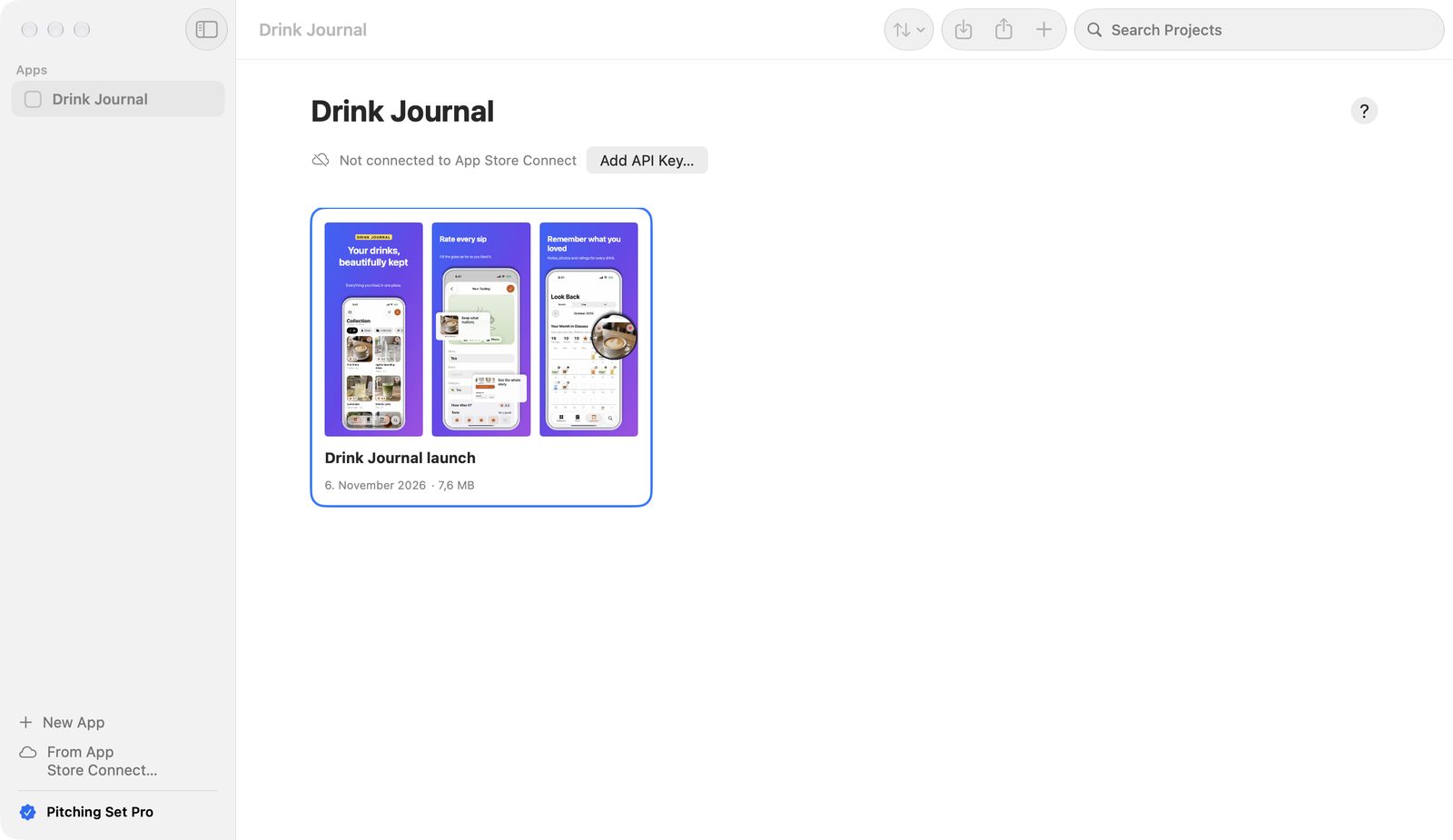
This documentation shows you how to design, localize, and export App Store screenshots with Pitching Set on your Mac. Pitching Set is a macOS app by Viovenia UG (haftungsbeschränkt). People call tools like this an App Store screenshot generator, but nothing is generated without you: you design each image yourself, and the app supplies templates, device bodies, checks, and the right sizes.
What does Pitching Set do?
Pitching Set creates all the images and texts for an app's App Store presence in one place. That covers:
- screenshots for iPhone, iPad, Mac, Apple Watch, Apple TV, and Vision Pro
- panoramas
- header and search images
- In-App Event images
- app previews and promo videos
- product page texts
- launch graphics for Product Hunt, social networks, and other stores
The workflow
- Create an app.
- Create a project from a template or a ready-made set.
- Design the images: add screenshots, write texts, choose colors.
- Add languages and translate the texts.
- Check the outputs, then export them as PNG files.
With Pro, you can also import apps from App Store Connect and send images and texts directly there.
With Pro, an AI client such as Claude, Cursor or Codex also works in a project you share for it, through the AI connection.
Pitching Set doesn’t submit or publish anything. You do that in App Store Connect. Nobody can promise you Apple's approval in advance, and neither can this app.
Chapters
| Chapter | Contents |
|---|---|
| Getting started | From first launch to finished screenshots; managing apps, projects, and sets |
| Templates | Gallery, all templates, ready-made sets, palettes |
| Panoramas | Objects and gradients across several images |
| Editor | Canvas, objects, text, device bodies, inspector |
| Localization | Adding languages, translating, importing screenshots per language |
| Export | Checks, PNG export, project packages |
| Sizes | All 27 formats with pixel sizes |
| Product page | Name, subtitle, keywords, description, and more |
| App previews and videos | App previews and promo videos |
| App Store Connect | Keys, comparison, sending, backups |
| AI connection | MCP server for Claude, Cursor and Codex: set up a client, share a project, review plans |
| Pro and pricing | What is free, what needs Pro, the subscription |
| Mac integration | Spotlight, Dock, Shortcuts, Settings, Help |
| Keyboard shortcuts | Every shortcut |
| Troubleshooting | Messages and what to do next |
| FAQ | Common questions about App Store images and the app |
Terms
| Term | Meaning |
|---|---|
| App | The entry in the sidebar. An app groups projects and can be connected to an app in App Store Connect. |
| Project | A file with sets, images, and product page texts. |
| Set | A series of images, usually up to ten. A set produces all formats in all languages. |
| Image | A single picture within a set. |
| Format | A fixed pixel size, such as iPhone · 6.3″ at 1206 × 2622 pixels. |
| Output | One format in one language. The canvas always shows exactly one output. |
| Source Language | The language you translate from and the one you export for free. |
| Image Area | The place in a template where a screenshot goes. |
AI features
Three Pitching Set features work with AI: two with Apple technology that runs on your Mac, one with the AI client you already use. All of them need Pro.
| Feature | What it does | Chapter |
|---|---|---|
| Text suggestions with Apple Intelligence | Suggestions… writes five versions of the selected text in the editor. On the product page, it writes suggestions for subtitle, promotional text, keywords, What's New, and description. You need a Mac with Apple Intelligence turned on. | Editor, Product page |
| Translation with Apple Translation | Translates missing text in your screenshots and your product page texts into other languages. macOS downloads the language packs. | Localization, Product page |
| AI connection over MCP | A local MCP server lets Claude, Cursor or Codex read a project you share and change it through plans that ⌘Z undoes. | AI connection |
| When it doesn't work | Messages about translation and text suggestions, and what to do next | Troubleshooting |
System requirements
Pitching Set runs on macOS 26 and later.
Text suggestions need a Mac that supports Apple Intelligence with it turned on. Apple Translation gets its language packs through macOS.
Free and Pro
For free, you design everything and export the required formats for iPhone, iPad, and Mac in the set's source language. Further languages and formats, videos, translation and text suggestions, all templates, and the imports for developer tools belong to Pitching Set Pro. Details are in Pro and pricing.
Sending to App Store Connect belongs to Pro as well.
Data and account
Pitching Set needs no account, runs no servers of its own, and collects no statistics. Data leaves your Mac only when you start a function that needs Apple, and then it goes to Apple. You'll find the privacy policy in the app under Help → Privacy Policy.
Download and support
- App Store: Coming soon to the Mac App Store
- Contact: viovenia.com/en/contact or info@viovenia.com
- In the app: Help → Contact Support… writes an email with the app and macOS version, without any project content.